
Lumin Sign vs SignNow: Features and pricing comparison
Lumin Sign and SignNow are two of the biggest contenders in the eSignature solution space. But which one has the features, security, pricing and API functions you're looking for?
Table of contents
- 1. What is Lumin Sign?
- 2. What is SignNow?
- 3. Features
- 4. API functionality
- 5. User experience
- 6. Security
- 7. Pricing
- 8. Lumin Sign and SignNow: Side-by-side comparison
- 9. Summary
Share this post
As your team grows, using software that simply collects eSignatures just won't cut it anymore. You need a full-service modern eSignature workflow tool that delivers documents to the right people, sends reminders, tracks progress and integrates signing directly into your software and applications via an API.
This way, you can guarantee a smooth and secure signing process from start to finish.
Enter Lumin Sign and airSlate SignNow — two powerful platforms that take care of all your eSignature workflow needs, no matter how complex they may be. We'll tell you what sets these tools apart so you can find the best match for your organization.
What is Lumin Sign?
Lumin Sign does so much more than just collect eSignatures. It's a comprehensive cloud-based eSignature workflow automation platform that lets you send signable documents to multiple recipients simultaneously.
You can also track those documents, set up automated reminders for signees to take action and ensure everything is secure and legally compliant.
What is SignNow?
SignNow offers a similar eSignature experience to Lumin Sign and many of the same features. You can send signable documents to multiple recipients, track those documents across the web and receive notifications when people fail to sign.
Both Lumin Sign and SignNow cater to organizations of all sizes, providing standard and more enterprise-level features depending on the size of your team and the complexity of your eSignature automation needs.
Features
Lumin Sign and SignNow provide everything you need to capture legally binding and secure eSignatures straight out of the box, helping you complete and negotiate contracts with ease.
For example, both platforms allow recipients to sign documents without creating an account, which can speed up turnaround times and simplify the eSignature process.
Also, you'll find a wide range of templates on both Lumin Sign and SignNow, eliminating the need to create documents from scratch. These templates include tax forms and contractor agreements.
Lumin Sign and SignNow let you manage eSignatures and documents from the tools you already use, thanks to flexible integrations. Lumin Sign connects with Dropbox, Google Drive, HubSpot and more, while SignNow connects with Teams, Salesforce, NetSuite and other services.
API functionality
Lumin Sign offers a fully compliant eSignature API with enterprise-grade security, which you can set up in minutes. This allows you to connect the platform with the software and apps you already use.
For example, you can save signed documents to your favorite cloud storage provider, which gives your team more flexibility.
This process is a lot easier than you may think. Lumin Sign lets you create a sandbox environment where you can experiment with different API integrations before going live.
SignNow also has an API that enables you to create custom connections with your CRM, productivity tools and other preferred software and apps.
Both Lumin Sign and SignNow have dedicated technical support to help you create automations.
User experience
Lumin Sign and SignNow have streamlined interfaces that provide a smooth user experience. While SignNow's dashboard is slightly more complicated, it's still simple enough for you to carry out various eSignature automation tasks without breaking a sweat.
Both platforms have dedicated mobile apps so you can manage documents and eSignatures on the go.
Security
Security is important when sharing documents with eSignatures online, with the average cost of a data breach reaching a massive $4.88 million in 2024.
Thankfully, both Lumin Sign and SignNow boast an incredible amount of security features that keep your information safe, including advanced data encryption and authentication.
Lumin Sign and SignNow also comply with PCI-DSS, GDPR, SOC 2 and other security certifications.
Pricing
Lumin Sign
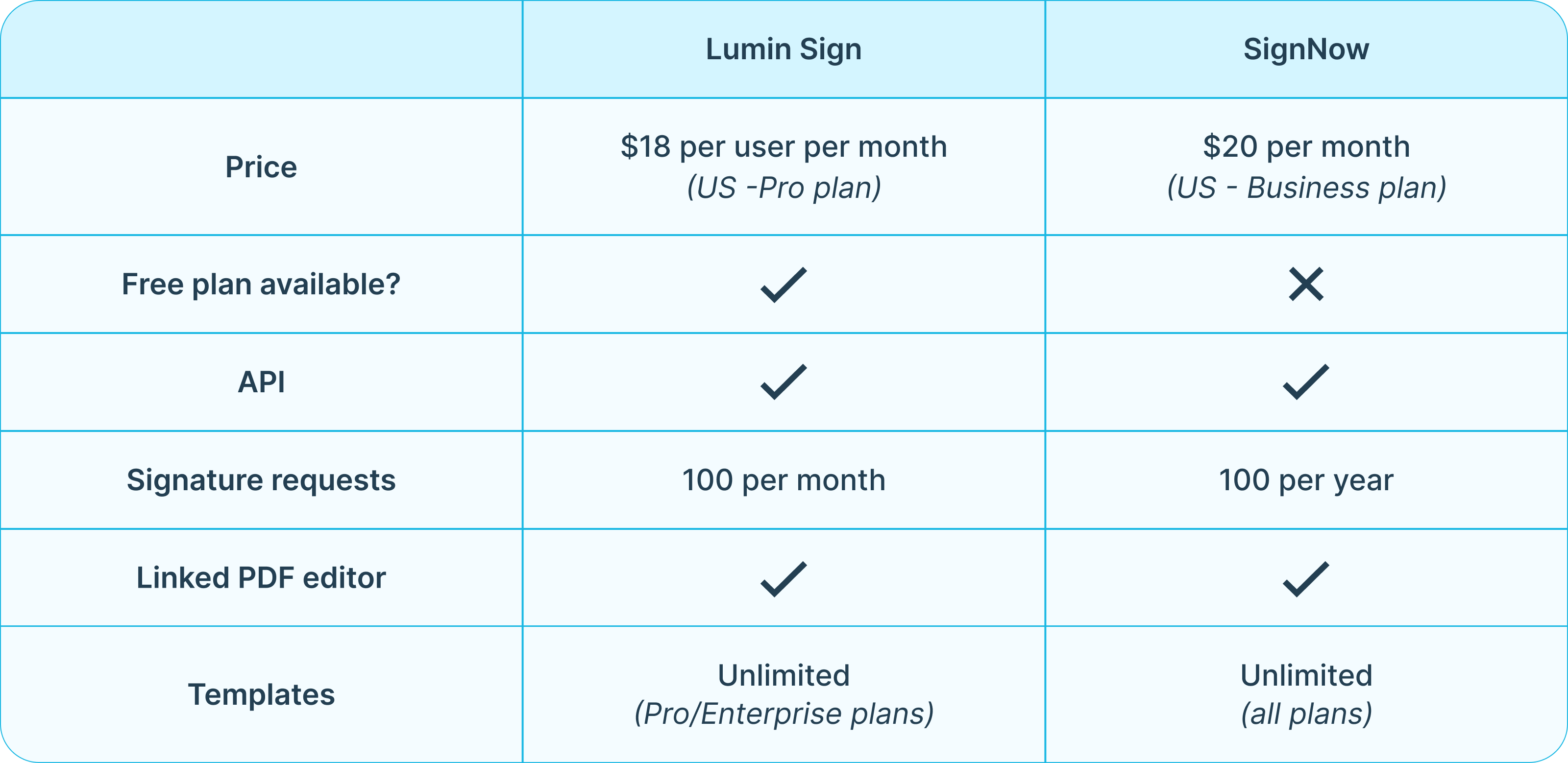
Lumin Sign offers various pricing tiers tailored to your specific needs. Its free plan lets you send five free documents a month, add multiple signers and fillable fields and much more.
With the Pro plan, you get everything on the free plan, plus additional features such as unlimited templates and a dedicated success manager, for only $18 per user per month (US). This plan also includes 100 signature requests (the number of documents a user can send for signing per month).
The Lumin Sign API is available on the Enterprise plan (contact Lumin for a price quote.)
SignNow
SignNow doesn't come with a free tier. Its entry-level plan, Business, costs $20 per month (US), allowing unlimited users to send signable documents with basic fillable fields. Other features include access to the company's mobile app, unlimited templates and cloud storage integration. SignNow also has a Business Premium and Enterprise plan, which cost $30 and $50 per month, respectively. You may be able to save money if you take out an annual subscription.
All SignNow plans come with 100 eSignature invites a year, which is considerably less than Lumin Sign's Pro plan (100 per month).
Lumin Sign and SignNow: Side-by-side comparison
Summary
Choosing between Lumin Sign and SignNow all depends on factors like your budget, the size of your team and eSignature workflow requirements.
If you’re looking to save money, Lumin Sign’s Pro plan comes with 100 signature requests per month for a lower monthly cost — compared to 100 signature requests per year with SignNow. However, the latter might be a better option if you need a particular integration that Lumin Sign doesn’t offer.
The great thing about Lumin Sign is that you can carry out basic tasks for no cost with its free plan and take things from there. If you need more functionality, you can always upgrade for just $18 per user per month.
See our other eSignature tool comparison guides:

Share this post