
Salesforce eSignatures: Lumin Sign vs Docusign
Lumin Sign and Docusign both integrate with Salesforce, allowing you to collect legally binding digital signatures without ever leaving your CRM. But which one comes out on top?
Table of contents
- 1. Quick comparison of Lumin Sign's and Docusign's Salesforce apps
- 2. Lumin Sign for Salesforce overview
- 3. Docusign eSignature for Salesforce overview
- 4. Features
- 5. Pricing
- 6. Document generation
- 7. User experience
- 8. Security
- 9. Summary
Share this post
Annoyingly, Salesforce still lacks built-in eSignature functionality, and until recently, the only option was to switch platforms to get documents signed, which seriously slowed down workflows.
Now, thanks to eSignature automation tools like Lumin Sign and Docusign, you can gather and manage signatures directly within Salesforce, meaning everything's kept in one place. They both have apps that natively integrate with the CRM, allowing deals and approvals to stay on track.
Quick comparison of Lumin Sign's and Docusign's Salesforce apps
Lumin Sign for Salesforce overview
Lumin Sign for Salesforce is designed specifically for growing businesses that want to collect, track and manage eSignatures within the CRM they know and use.
You can download Lumin Sign's Salesforce app from the AppExchange and start using it straight away. There's no code or complicated setup to worry about.
Docusign eSignature for Salesforce overview
Docusign eSignature for Salesforce also lets you handle eSignatures directly in Salesforce, removing the back and forth that can delay deals, approvals, document reviews and contract negotiations. It's available to download in the AppExchange.
Docusign is still the market leader when it comes to digital signatures, but that doesn't mean it's the best fit for your team.
Features
While Lumin Sign's and DocuSign's Salesforce apps essentially do the same thing at their core, both serve different types of business needs. Docusign's app, for example, offers more enterprise-grade features, including high-level reporting and analytics. However, you might not need these extras, which come at the cost of a higher price and additional complexity.
Lumin Sign's app keeps things simple. Larger companies can still use it, but it doesn't overwhelm SMBs with excess features they probably won't use. Instead, its primary focus is clear: sending contracts and other legal agreements for signature using information from Salesforce.
Pricing
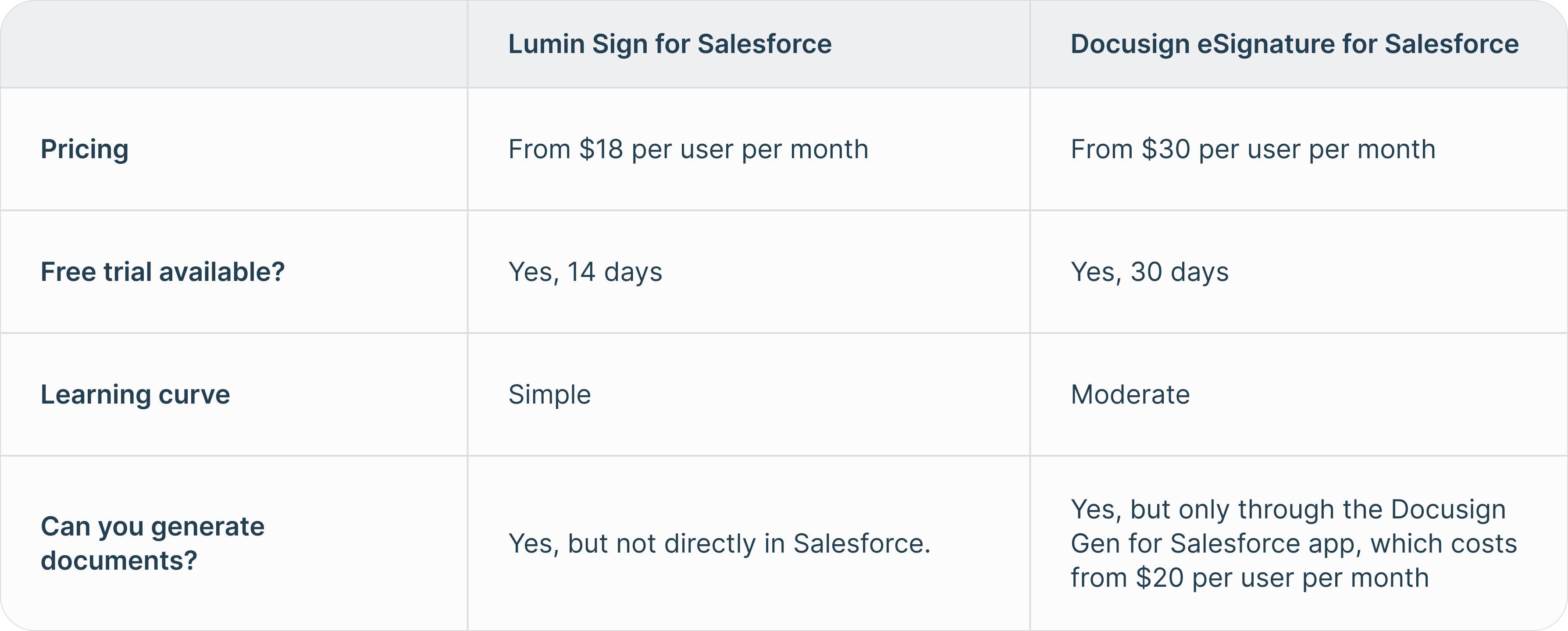
Perhaps the biggest difference here is price. Lumin Sign’s Salesforce app is available from just $18 (USD) per user per month. Meanwhile, prices start from $30 per user per month for DocuSign’s app (from $50 per user per month if you include the document generation app, which we talk about below). It's worth noting that Docusign's pricing is just for core functionality, and there are additional fees to use certain features, meaning costs can quickly add up.
If you want to try these tools, Lumin Sign for Salesforce offers a free 14-day trial, while Docusign eSignature for Salesforce offers a free 30-day trial.
Document generation
One thing that Lumin Sign's app currently lacks is the ability to generate documents in Salesforce. Docusign provides this functionality, but only through its Docusign Gen for Salesforce app, which costs from $20 per user per month. You'll have to pay that on top of your Docusign eSignature for Salesforce subscription.
You can always generate documents in Lumin's AgreementGen, upload them to Lumin Sign and then pull them into Salesforce through the Lumin Sign for Salesforce app. While this takes a little extra time, it could work out a lot cheaper.
User experience
Because it has more features, Docusign eSignature for Salesforce requires a somewhat steeper learning curve than Lumin for Salesforce. Its interface can also feel cluttered, and it may take some time to find what you need. Of course, it's nowhere near as complicated as learning Salesforce itself, but your workflows might slow down a bit until you become familiar with everything.
Lumin Sign's app, on the other hand, was built for simplicity. One of the best things about it is that the people who receive your documents can sign them on any device without having to create an account or log in.
Security
Linking a third-party tool with your Salesforce account may make you anxious, but there's no need to be. Lumin Sign's and Docusign's apps come with world-class security, so you can get documents signed and close deals without worrying about a data breach.
Both tools have industry-accepted certifications and meet various compliance standards and regulations. The only real difference is when it comes to healthcare data: Lumin is currently pursuing HIPAA compliance, while Docusign already supports it once you enter into a Business Associate Agreement (BAA) and configure the right security settings.
Summary
While Salesforce itself doesn't have any eSignature functionality, Lumin Sign and Docusign both offer native integrations for the CRM, allowing you to collect and manage digital signatures with ease. While they share core features, Lumin Sign's app is cheaper and easier to use than Docusign's, potentially making it a better fit for SMBs.

Share this post