Lumin Sign vs SignWell: Which eSignature tool is right for your team?
author
Kirk Pepi
published
Aug 7, 2025
categories
eSigning
read time
3 mins
Is Lumin Sign or SignWell a better fit for your team? We continue to compare eSignature solutions on the market so you can make more informed decisions.
You can also read this article in Português.
Table of Contents
1. An overview of Lumin Sign
2. An overview of SignWell
3. Features
4. Integrations and API
5. User experience
6. Security
7. Pricing
8. Comparison of Lumin Sign vs SignWell
9. Summary
- 1. An overview of Lumin Sign
- 2. An overview of SignWell
- 3. Features
- 4. Integrations and API
- 5. User experience
- 6. Security
- 7. Pricing
- 8. Comparison of Lumin Sign vs SignWell
- 9. Summary
share this post
Collecting and managing electronic signatures doesn't have to be a hassle when you use Lumin Sign or SignWell. Both tools help you get documents signed without the stress, removing the headache of chasing down paperwork across the web.
But which platform should you choose? We've stacked them side by side, letting you quickly compare features, pricing, API functionality and more.
An overview of Lumin Sign
Lumin Sign is an end-to-end eSignature solution for legal agreements and other important documents. Think of it as an all-in-one solution that handles every aspect of eSignature workflow automation, from sending documents for legally binding signatures to tracking the status of documents from any device to all parties receiving a final signed doc that has a fully auditable eSignature trail.
An overview of SignWell
SignWell, formerly known as Docsketch, also simplifies the eSignature workflow process. It allows you to collect legally binding signatures with just a few clicks, track unsigned and completed documents and seamlessly manage signees with ease.
Both platforms are part of larger ecosystems that provide access to advanced tools for editing and preparing documents. For example, in addition to eSignatures, Lumin offers a powerful PDF editor and an AI-powered contract generator for drafting agreements.
Features
Lumin Sign and SignWell have loads of features for capturing, tracking and managing eSignatures, including bulk signing and templates for commonly used documents - think leases, consent forms, purchase orders and more. You can also receive notifications when someone signs a document and send signing reminders to recipients to keep your workflows moving.
If you want to manage eSignatures on the move, Lumin Sign has dedicated mobile apps for iOS and Android devices. SignWell doesn't have any apps, so you'll have to use a computer.
Integrations and API
One difference between these tools is how they integrate with other software and apps your team uses. SignWell connects with Google Suite, Salesforce, Slack and other platforms through a Zapier integration. Lumin Sign offers the same integrations through Zapier but also integrates directly with Dropbox, Google Drive, Monday.com and more.
Both tools come with an easy-to-use API if you need more control and customization in your eSignature workflows. For instance, you can set up Lumin Sign's API in just a few minutes and experiment with different integrations in a sandbox environment before going live.
If you do need help, don't worry. Lumin Sign and SignWell have dedicated technical teams that can get everything up and running.
User experience
If you're new to eSignature automation, you'll have no issues using Lumin Sign or SignWell. These platforms have simple interfaces that allow you to send signable documents to recipients without the steep learning curve.
If you do hit a snag, both tools have help centers that let you troubleshoot problems.
Security
Lumin Sign and SignWell adhere to various eSignature legislation, helping you stay on the right side of the law. They also comply with security and privacy standards, such as SOC 2, CCPA and GDPR.
One difference is that SignWell is compliant with HIPAA, making it a good choice for healthcare teams. Lumin Sign currently doesn't offer this but is working on it.
Pricing
You can get basic features on Lumin Sign and SignWell at no cost with their free tiers. However, larger teams will benefit from a paid plan.
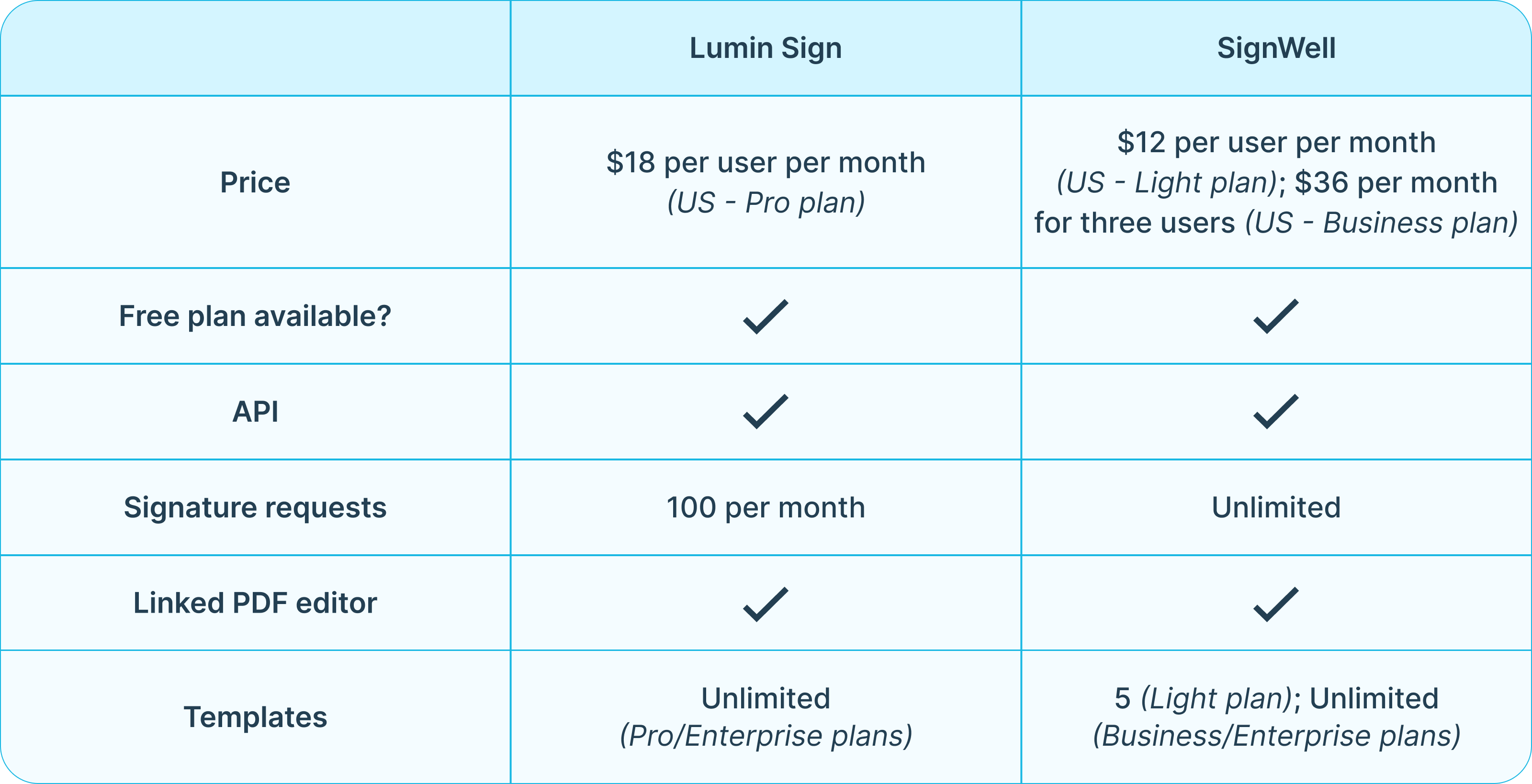
Lumin Sign's Pro plan lets you send 100 documents for signing a month, use unlimited document templates, set up automatic email reminders and more for $18 per user per month (US).
SignWell's Light plan allows you to send unlimited documents a month, access five templates, set up automatic email reminders and more for $12 per user per month (US). To get the unlimited templates you get with Lumin and other features, you'll need to upgrade to the Business plan, which costs $36 per month for three users.
Lumin Sign's and SignWell's APIs are only accessible on their Enterprise plans. Neither company publishes prices online for this option, so you'll have to contact them for a custom quote.
Comparison of Lumin Sign vs SignWell
Summary
Lumin Sign and SignWell both enable you to collect, monitor and manage digital signatures successfully, regardless of your team size or industry. However, there are some differences between these platforms that you should consider. For example, Lumin Sign has a mobile app for managing eSignatures on the go, while SignWell doesn’t offer this feature.
For more advanced customization, both tools let you sync your eSignature workflows with your favorite software and apps through integrations and an API. You’ll also benefit from a smooth and accessible user experience on these platforms, which will benefit your team.
Ultimately, the choice is yours, so weigh up each platform to find the perfect fit. Lumin Sign is the only one of the two to offer a free trial, so why not try out its features at no cost before making a decision?
See our other eSignature tool comparison guides:
share this post