
Lumin Sign vs Zoho Sign: A complete comparison
We've done all the hard work comparing Lumin Sign and Zoho Sign, so you don't have to. Here's a side-by-side look at how these eSignature workflow automation tools stack up.
Table of contents
- 1. Overview of Lumin Sign
- 2. Overview of Zoho Sign
- 3. Features
- 4. Integrations and API
- 5. User experience
- 6. Security
- 7. Pricing
- 8. Lumin Sign vs Zoho Sign: Head-to-head comparison
- 9. Summary
Share this post
If you want to request, track and manage signatures, Lumin Sign and Zoho Sign both get the job done — no need to print, mail or chase down paperwork. However, choosing between them can be a bit tricky if you're not sure what to look for. Luckily, we've compared these tools for you so you can decide which one best suits your team.
Overview of Lumin Sign
Lumin Sign makes collecting, tracking and managing digital signatures simple and stress-free. It has everything you need to manage your eSignature workflow tool, from setting up automated reminders for signees to managing signatures on various devices, including your computer, tablet and phone.
You can also define the order in which you'd like people to sign, receive notifications when someone signs a document and ensure your PDFs and other docs are legally compliant and adhere to important standards in your industry.
Overview of Zoho Sign
You may already be familiar with Zoho and its software suite, which includes marketing tools and a CRM. Zoho Sign is another one of its products, designed to simplify the often-complicated process of collecting and tracking digital signatures.
Like Lumin Sign, Zoho has all you need to capture eSignatures, track signed documents across the web and ensure everything's legally sound.
Both tools have different pricing tiers that cater to your specific needs, meaning you won't pay for features you don't need — unlike with some other eSignature tools.
Features
Lumin Sign and Zoho Sign share many features, including secure document tracking, multi-device accessibility and third-party integration via an API. Both tools also offer templates for commonly used signable documents, such as sales agreements and rental leases. This removes the need to create paperwork from scratch.
Lumin Sign has some features you won't find on Zoho Sign, and vice versa. For example, Zoho offers phone support, whereas Lumin only provides email support. However, Lumin Sign has a really simple learning curve, and its online training resources are more than enough for any newbie.
One thing Zoho doesn't offer is an AI agreement editor. Lumin's AgreementGen is a powerful tool that transforms static files like PDFs into dynamic and customizable documents. AgreementGen also empowers you to draft agreements with the help of an AI-powered assistant, which can then be sent on for signing — all from the same platform.
Integrations and API
Customize your eSignature automation workflows with Lumin Sign's and Zoho Sign's respective APIs. With a little coding knowledge, you can connect each tool with the software and apps used in your organization, such as CRMs, ERPs and cloud storage platforms.
Both platforms also offer direct integrations with various services. Lumin Sign connects with Slack, Google Drive, Hubspot and many other tools (including the Zoho CRM). Zoho Sign has its own broad selection of integrations, including with other apps in the Zoho suite. Lumin Sign and Zoho Sign also integrate with Zapier, offering access to an even wider range of integration opportunities.
If this all sounds a bit overwhelming, Lumin Sign and Zoho Sign have technical support teams that guide you through the API setup process.
User experience
If you've never used a digital signature solution before, you might think that it's not very easy to do so. The good news is that Lumin Sign and Zoho Sign have user-friendly interfaces and simple navigation, so you don't need to be a tech wizard to get started. If you do get stuck, both platforms provide online help centers that tell you everything you need to know.
These tools also have mobile apps, so you don't have to be tied to a computer to manage eSignatures.
Security
Collecting legally valid signatures online can pose all kinds of safety risks if you don't use a platform that takes security seriously. Luckily, Lumin Sign and Zoho Sign go above and beyond to protect your information, which is particularly important when sharing non-disclosure agreements (NDAs) and other sensitive documents.
Many of the security features of these tools overlap, including data encryption at rest (using AES 256) and secure cloud data hosting.
Pricing
First things first, both Lumin Sign and Zoho Sign offer free plans with some basic features that may suit super-small teams, such as the ability to send up to five documents for signing per month.
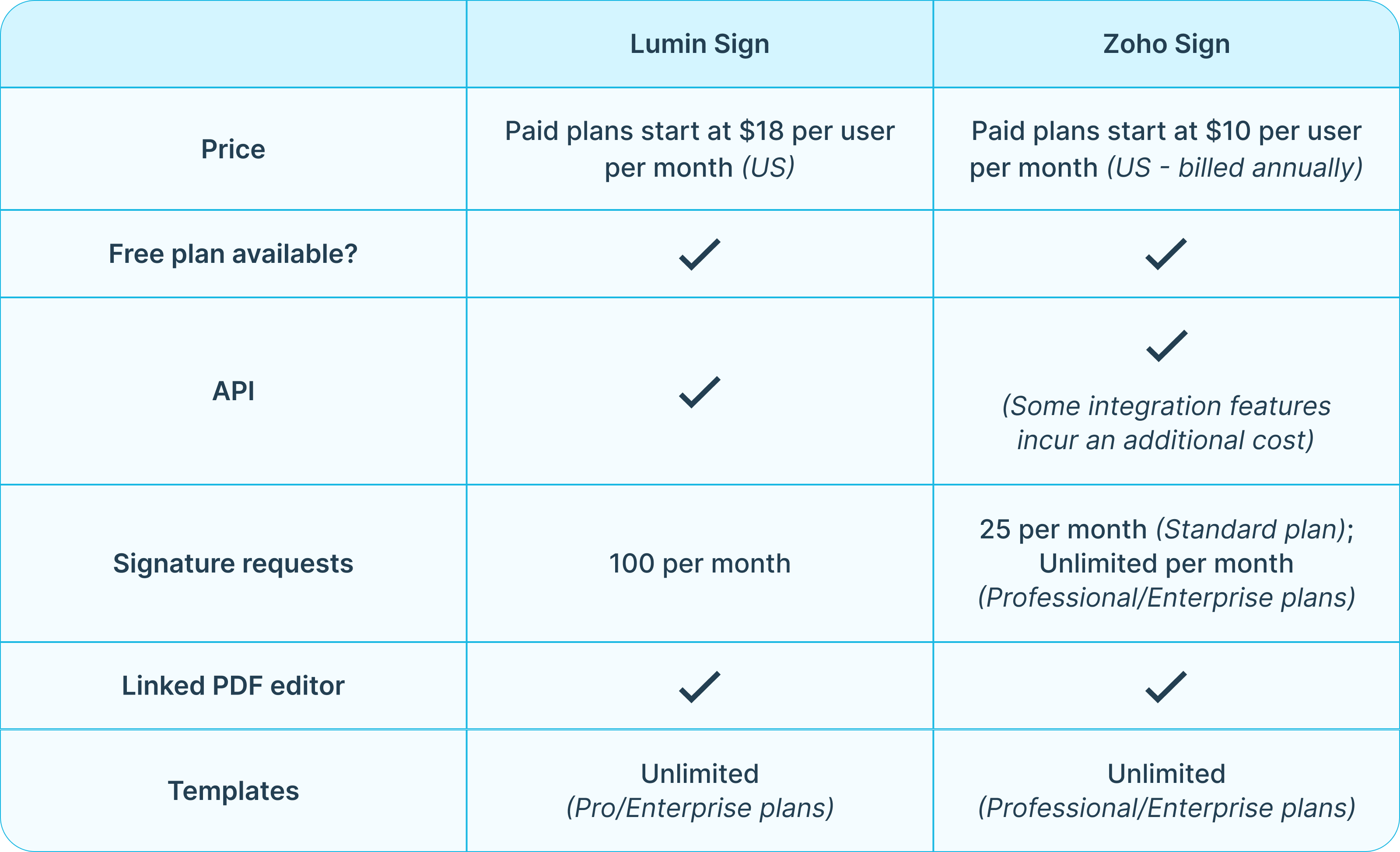
Larger teams, however, need more advanced capabilities, which is where Lumin Sign's and Zoho Sign's paid tiers come in. Lumin Sign's Pro plan includes the ability to send up to 100 documents each month for signing and features such as automated email reminders for signees, certifications of document signing completion and unlimited document templates. It costs $18 per user per month (US).
Zoho Sign also has different plans for bigger teams that offer different features depending on your needs. The Standard tier costs $10 per user per month (US); however, this is limited to 25 signed documents per month. The Professional tier is $16 per user per month.
If you want to use an API to customize your eSignature workflows, you'll have to subscribe to Lumin Sign's or Zoho Sign's Enterprise plan. The latter costs $22 per user per month, billed annually, while Lumin Sign has custom pricing tailored to your needs (contact Lumin to get a quote).
With Zoho Sign, you may have to purchase credits for features and integrations that incur an additional cost, such as document timestamping and bulk sending documents. These credits cost $0.10 each and come in packs of 500. The Enterprise plan offers 50 complimentary credits per user per month (capped at 2500 per organization).
Lumin Sign doesn’t have a credit system, making pricing more predictable and transparent.
Lumin Sign vs Zoho Sign: Head-to-head comparison
Summary
While Lumin Sign and Zoho Sign are similar, each offers features not found in the other, such as Lumin's AgreementGen. There are also differences when it comes to pricing and support. Weigh up both platforms to find the right one for your team.
If Lumin Sign is the best fit, you can try it for free.
See our other eSignature tool comparison guides:

Share this post