Lumin logo
  • Lumin Products
    • AgreementGen

      Your agreement drafting sidekick

    • Lumin Sign

      Simple and secure digital signing

    • Lumin PDF

      Edit, collaborate, and share PDFs

    • Lumin AI

      Supercharge your docs

    Download Apps
    API and Integrations
    • eSign API

      Seamless eSignature integration

    • Integrations

      Streamline your workflow with ease

  • AgreementGen

    • AI agreement generator

    • AI agreement editor

    • NDA generator

    • Lease agreement generator

    • Employment contract creator

    • Terms and conditions generator

    • Operating agreement generator

    • Non-compete agreement generator

    • Business plan generator

    Lumin Sign

    • Sign PDF

    Lumin PDF

    • Edit PDF

    • Edit PDF text

    • Collaboration

    • Create fillable PDF

    • Merge PDF

    • Unlock PDF

    • Integrate Google

    All tools
  • By use cases

    Streamline efficiency

    Use the cloud to reduce the burden of countless tools

    Build relationships

    Collaborate and negotiate with a few clicks

    Secure with confidence

    Comply and stay with global security standards

    Onboard from anywhere

    Automate contract admin to seal deals faster

    Accelerate collaboration

    Make teamwork seamless with a centralized suite of tools

    Work on site

    Fast-track fieldwork with offline mode for mobile

  • Discover

      Blog

      News and views on collaborative workflows

      Template Discovery

      Find, fill and sign 5,000+ free online forms

      Customer Stories

      Discover companies creating more impact with less admin

    Support

      Lumin 101

      New here?
      Learn the basics

      Help Center

      Your complete manual to Lumin and Lumin Sign

  • Enterprise
  • Pricing
  • Request a demo
Try for freeSign in
Request a demo
Sign in
Try for free

Rotate PDF

Quickly fix sideways or upside-down pages with Lumin’s Rotate PDF tool. Rotate one, many, or all pages—on any device, with changes saved permanently.

One moment...

or drop your first file here

You're in good company

costco logo
spotify logo
salesforce logo
pinterest logo
knightFrank logo
paypal logo
uber logo
costco logo
spotify logo
salesforce logo
pinterest logo
knightFrank logo
paypal logo
uber logo
costco logo
spotify logo
salesforce logo
pinterest logo
knightFrank logo
paypal logo
uber logo

How to rotate a PDF

Quickly fix sideways or upside-down pages with Lumin’s Rotate PDF tool. Rotate one, many, or all pages—on any device, with changes saved permanently.

  • 1

    Step 1

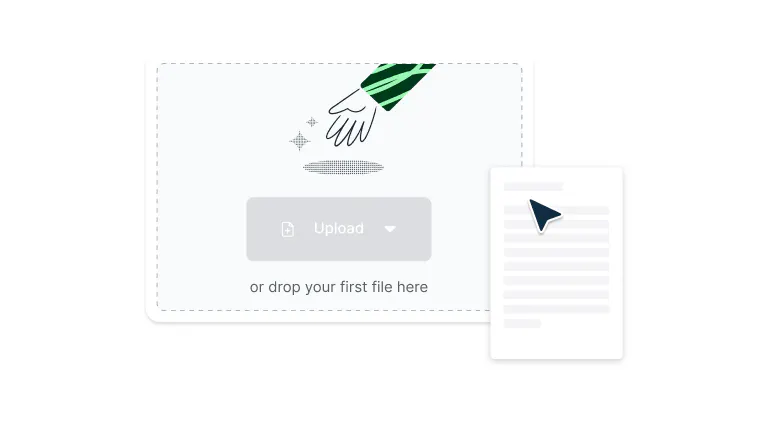
    Drop your PDF file into the dropzone above or click the 'Upload' button.

    A file being uploaded to Lumin
  • 2

    Step 2

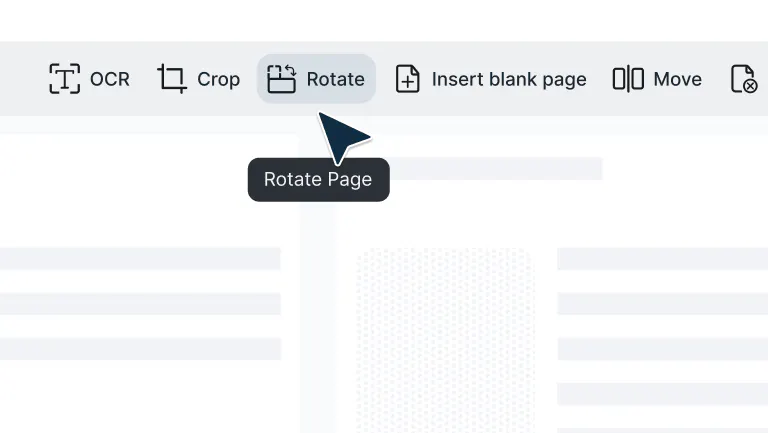
    Select ‘Page tools’ and then click the ‘Rotate’ tool.

    Rotate page tool in Lumin
  • 3

    Step 3

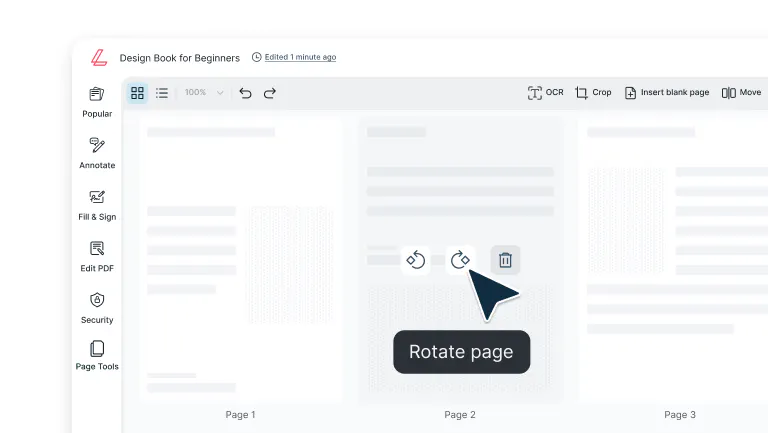
    Rotate pages individually or rotate all pages in the PDF.

    A page being rotated in Lumin

Powerful rotation features that save time

From fixing scanning errors to rotating entire documents, Lumin gives you simple, precise controls to keep your PDFs properly aligned.

  • Smart rotation controls

    Whether you're fixing a sideways scan or flipping an upside-down page, just click to rotate left or right by 90 or 180 degrees. It's that simple. No more tilting your head or printing wonky documents.

  • Rotate one page, or all

    Rotate just one page, a few pages, or your whole document: whatever makes sense for your workflow. No need to fix things one page at a time when you don't need to. 

  • Rotate on any device

    Rotate PDFs instantly from your Mac or Windows desktop, or on an iPhone, iPad or other mobile device. No desk is required—just tap, rotate, and done.

  • Works with document merging

    Combine multiple PDFs while keeping everything properly aligned. Rotate pages in different files, then merge them into one polished document that looks professional from front to back. 

  • Google Drive integration 

    Open, rotate, and save PDFs directly from Google Drive without the usual file shuffling. Your rotated documents sync automatically with Google Workspace, so your team gets properly oriented files immediately. 

  • Fix scanning errors instantly

    Sideways scans, upside-down pages, that one random page at a weird angle – our rotation tool handles all the common scanning errors so your PDFs display and print correctly every time. 

Frequently Asked Questions

  • Google Drive doesn’t offer a built-in way to rotate PDFs permanently, but fortunately, Lumin PDF is integrated with Google Drive. Just right-click the PDF file in your Drive, select Open with > Lumin PDF, then use the Page Tools to rotate specific pages or the entire file. Once you’re done, your changes will be saved directly back to your Drive.

    Check out our guide to editing PDFs in Google Drive for more tips. 

  • Absolutely. Lumin preserves all your rotation changes when you save or download your file. The rotated orientation becomes permanent in your saved PDF, so your document maintains proper alignment no matter where it's opened or who's viewing it.

  • Select the specific pages that need adjustment instead of rotating the entire document. Use our page selection controls to target problem pages while leaving the correctly oriented ones alone. It's precision control that saves time and prevents unnecessary changes to pages that are already perfect.

  • Scanning mishaps happen to everyone. Upload your PDF, spot the problem pages, select them, and rotate 90° left, 90° right, or flip 180° as needed. Our rotation tool is built specifically for fixing these common scanning errors, turning document disasters into professional files in seconds.

  • Yes, select multiple pages or rotate your entire document in one go. This bulk rotation feature is perfect when several pages share the same orientation issue, saving you from the tedium of rotating pages one by one. Work smarter, not harder.

  • Navigate through your document, identify the pages that need fixing, select them individually or in groups, and apply the right rotation. This targeted approach means you only adjust what needs adjusting while keeping properly oriented content exactly as it is — precision where you need it, efficiency where you want it.

  • If you make a mistake while rotating pages, simply repeat the rotation process to correct it. Click the rotate button again to continue rotating the page until it reaches the desired orientation. 

    Since each click rotates the page 90 degrees, you can easily fix any rotation errors by clicking the rotation button until the page is properly aligned. 

  • Yes, Lumin PDF offers a free way to rotate PDFs, making it easy and efficient to update your files. It’s fully integrated with Google Drive, so you can rotate PDFs directly from your Drive without downloading anything.

    By creating a free Lumin account, you’ll unlock access to a full suite of PDF editing tools—including scanning PDFs, redacting sensitive information, and more. 

Trusted by more than 100 million customers

2,000+ reviews

g2trustpilotcapterra

Featured Articles

PDF document being resized in Lumin

PDF editing

• Dec 3, 2025

How to resize a PDF

Need to resize a PDF but not sure where to start? Whether you're shrinking a file for email, adjusting page dimensions for printing, or freeing up storage space, this guide covers every method you’ll need.

Read more How to resize a PDF→
A person adding new pages to a PDF document

PDF editing

• Jul 24, 2025

How to add pages to a PDF

Need to add pages to a PDF? This guide shows you how to insert blank pages or merge pages from another PDF quickly and securely.

Read more How to add pages to a PDF→
A person editing a PDF on a Mac

PDF editing

• Jul 18, 2025

How to edit a PDF on Mac (free and easy options)

Edit PDFs on your Mac effortlessly with free tools. From basic markups to full editing and signing, no downloads or costly software required

Read more How to edit a PDF on Mac (free and easy options)→

Discover Lumin’s products

Collaborate with existing colleagues and onboard new ones with Lumin and Lumin Sign. Our innovative solutions work great on their own, but they’re even better together.


Lumin

Lumin

An easy-to-use PDF editor that stands alone or integrates with Google Workspace.
Learn more
Lumin Sign

Lumin Sign

A digital signature workflow tool that seals deals with legally-compliant signatures.
Learn more
Lumin Sign API

Lumin Sign API

An eSignature API designed to be plugged into your platform with minimal effort.
Learn more

Lumin tools

Lumin PDF

Lumin PDF

  • Organize
    Merge PDF
    Merge PDF
    Split PDF
    Split PDF
    Delete PDF page
    Delete PDF page
    Compress PDF
    Compress PDF
    Rotate PDF
    Rotate PDF
    Organize PDF
    Organize PDF
    Extract PDF
    Extract PDF
    AI PDF
    AI PDF summarizer
    AI PDF summarizer
    Chat with PDF
    Chat with PDF
    Scan
    PDF OCR
    PDF OCR
    Scan PDF
    Scan PDF
  • Edit & annotate
    Edit PDF
    Edit PDF
    Crop PDF
    Crop PDF
    Annotate PDF
    Annotate PDF
    Edit PDF text
    Edit PDF text
    Create fillable PDF
    Create fillable PDF
    PDF reader
    PDF reader
    Redact PDF
    Redact PDF
    More
    Unlock PDF
    Unlock PDF
    Flatten PDF
    Flatten PDF
    Protect PDF
    Protect PDF
  • Convert to PDF
    PDF converter
    PDF converter
    JPG to PDF
    JPG to PDF
    PPT to PDF
    PPT to PDF
    Word to PDF
    Word to PDF
    Excel to PDF
    Excel to PDF
    PNG to PDF
    PNG to PDF
    Convert from PDF
    PDF to PNG
    PDF to PNG
    PDF to JPG
    PDF to JPG
    PDF to Word
    PDF to Word
    PDF to PPT
    PDF to PPT
    PDF to Excel
    PDF to Excel
AgreementGen

AgreementGen

  • AI agreement generator
    AI agreement generator
    AI agreement editor
    AI agreement editor
    NDA generator
    NDA generator
    Lease agreement generator
    Lease agreement generator
    Employment contract creator
    Employment contract creator
    Terms and conditions generator
    Terms and conditions generator
    Operating agreement generator
    Operating agreement generator
    Non-compete agreement generator
    Non-compete agreement generator
    Business plan generator
    Business plan generator
Lumin Sign

Lumin Sign

  • Sign PDF
    Sign PDF
  • Product

    • Lumin
    • Lumin Sign
    • AgreementGen
    • eSign API
    • Features
    • Plans & Pricing
    • Google Workspace
      Lumin for Slack
      Lumin for Chrome
      Lumin for Claude
      See all
  • Solutions

    • Streamline efficiency
    • Onboard from anywhere
    • Accelerate collaboration
    • Build relationships
    • Secure with confidence
    • Work on site
  • Learn & Discover

    • Help Center
    • Blog
    • Lumin 101
    • Customer Stories
    • Templates
    • Template categories
    • Template collections
  • Company

    • Who we are
    • Our mission
    • Careers
    • Become a partner
  • Security

    • Compliance & features
    • Personal data
    • Privacy policy
    • Terms of use
    • Status
    • Bug bounty program
  • Download

    • iOS & Android
    • Mac & Windows

    Contact

    • Support
    • Sales
    • Request a Demo
  • Contact

    • Support
    • Sales
    • Request a Demo
Google Cloud Partner

© 2014–2026 Lumin PDF Corporation | San Francisco, United States | All rights reserved

English
  • English
  • Español
  • Tiếng Việt
  • Português
  • Français