Lumin logo
  • Lumin Products
    • AgreementGen

      Your agreement drafting sidekick

    • Lumin Sign

      Simple and secure digital signing

    • Lumin PDF

      Edit, collaborate, and share PDFs

    • Lumin AI

      Supercharge your docs

    Download Apps
    API and Integrations
    • eSign API

      Seamless eSignature integration

    • Integrations

      Streamline your workflow with ease

  • AgreementGen

    • AI agreement generator

    • AI agreement editor

    • NDA generator

    • Lease agreement generator

    • Employment contract creator

    • Terms and conditions generator

    • Operating agreement generator

    • Non-compete agreement generator

    • Business plan generator

    Lumin Sign

    • Sign PDF

    Lumin PDF

    • Edit PDF

    • Edit PDF text

    • Collaboration

    • Create fillable PDF

    • Merge PDF

    • Unlock PDF

    • Integrate Google

    All tools
  • By use cases

    Streamline efficiency

    Use the cloud to reduce the burden of countless tools

    Build relationships

    Collaborate and negotiate with a few clicks

    Secure with confidence

    Comply and stay with global security standards

    Onboard from anywhere

    Automate contract admin to seal deals faster

    Accelerate collaboration

    Make teamwork seamless with a centralized suite of tools

    Work on site

    Fast-track fieldwork with offline mode for mobile

  • Discover

      Blog

      News and views on collaborative workflows

      Template Discovery

      Find, fill and sign 5,000+ free online forms

      Customer Stories

      Discover companies creating more impact with less admin

    Support

      Lumin 101

      New here?
      Learn the basics

      Help Center

      Your complete manual to Lumin and Lumin Sign

  • Enterprise
  • Pricing
  • Request a demo
Try for freeSign in
Request a demo
Sign in
Try for free

Securing digital agreements white paper

In a world where business relationships matter more than ever, Verified Digital Signing ensures every agreement is backed by genuine human identity, eliminating the uncertainty that slows down business and the vulnerabilities that put it at risk.
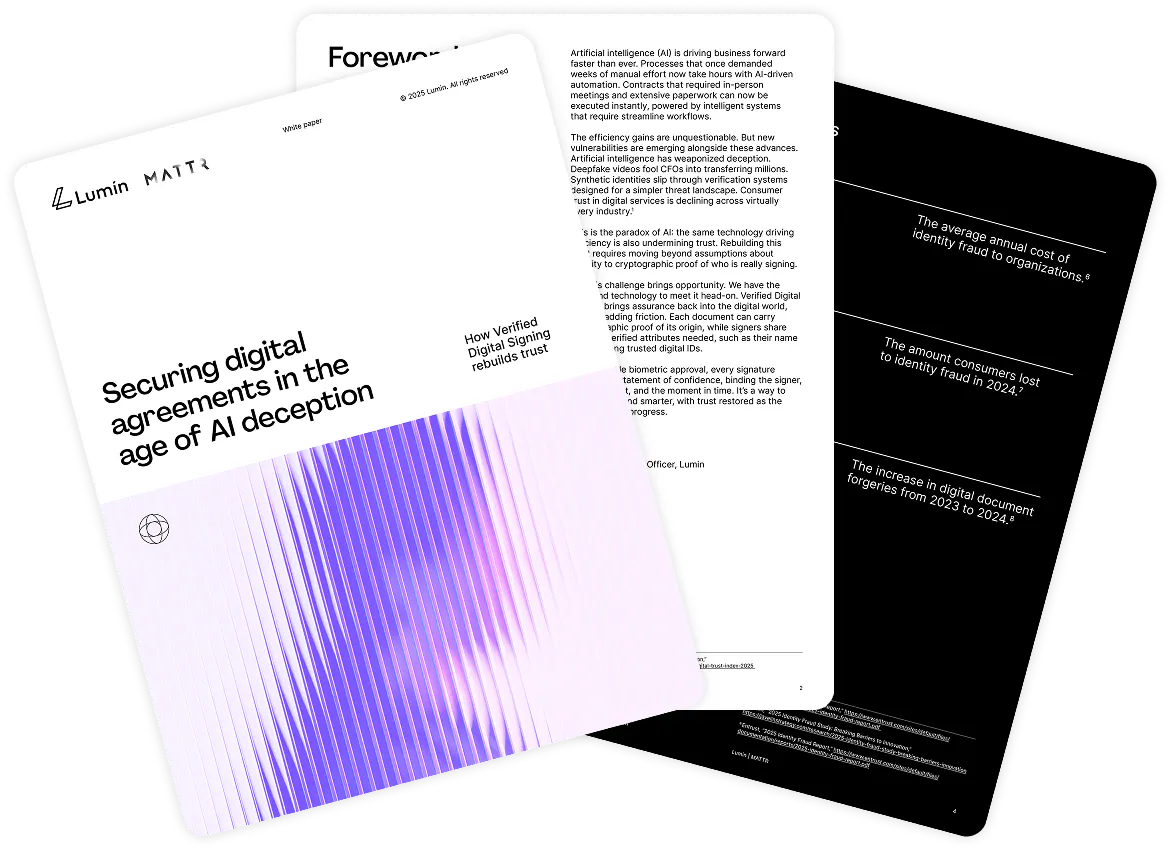
The first three pages of the white paper

Download the white paper

Enter your details to access the full white paper and learn how verified identity authentication strengthens digital signatures, improves auditability, and builds trust in high-value agreements. We'll also keep you updated with early access invitations and news.

Portrait of Lumin CEO, Max

“Identity fraud is growing in both frequency and sophistication, costing organizations $7 million each year.”

Max Ferguson, CEO of Lumin

Why Verified Digital Signing?

  • Diagram of an identity being verified

    Eliminate signature fraud

    On average, identity fraud costs organizations $7 million annually.

  • Diagram representing a smooth workflow

    Streamline business processes

    Transform complex workflows into smooth digital experiences with instant verification.

  • Diagram of steps representing progress

    Stay ahead with Verified Credentials

    Replace outdated KYC processes with verified, interoperable credentials.
  • Diagram of two hands shaking

    Safeguard your reputation

    Protect high-value deals and stakeholder relationships with digital trust infrastructure.

Lumin is trusted by 300+ Fortune 500 companies
Safeguard your business

Lumin Verified Digital Signing is SOC 2 Type 2 and ISO 27001 certified, trusted by Fortune 500 companies worldwide. Built on W3C and OpenID standards with government-backed cryptographic verification, our zero-knowledge architecture ensures enterprise-grade security, complete privacy preservation, and audit-ready compliance that meets the most stringent regulatory requirements.
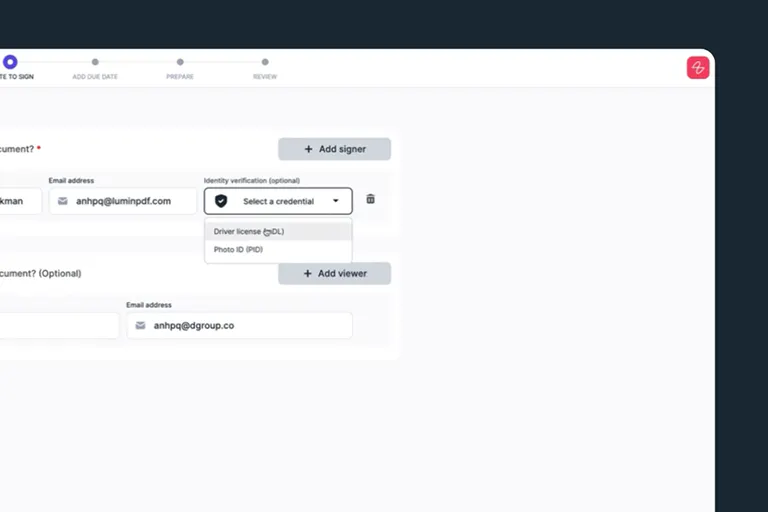
  • Sending for eSignature interface

    Send securely

    Select ‘Identity verification’ as a requirement, this ensures the recipient signs with their verified digital credential.
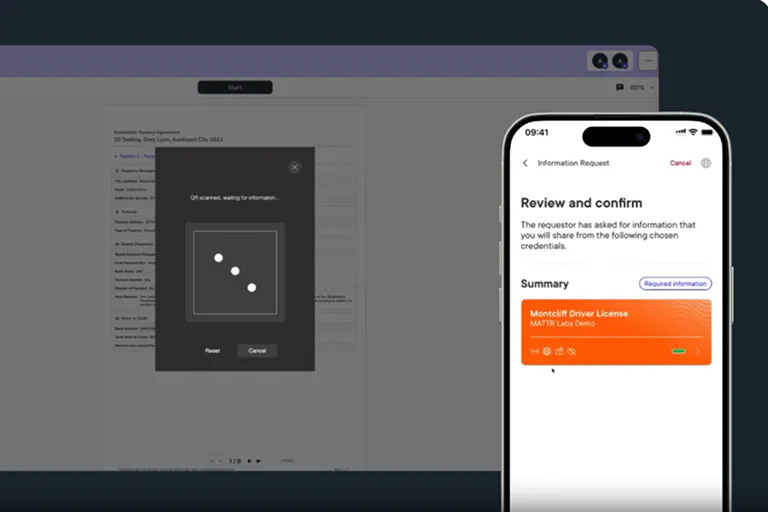
  • Using phone to sign verify identity

    ID-Verified Digital Signing

    The recipient scans a QR code and uses their government-issued digital credential to confirm their identity and sign.

  • Person receiving a notification about their signed document

    Receive signed agreement

    Once signed, the document is returned with cryptographic proof of the recipients verified signature using mDocs.

Industry-specific solutions

Designed for government agencies that need highly-trusted identity verification for citizen services and other official documentation. Meet compliance requirements while streamlining processes with cryptographic proof of identity that courts and auditors trust.

Image of a government building

Designed for enterprises managing high-stakes contracts, employee agreements, and vendor relationships at scale. Eliminate identity fraud while accelerating deal velocity with verified digital signatures that protect your reputation and bottom line.

Looking up at a large corporate office

Designed for growing businesses that need to protect against identity fraud while maintaining efficient contract and employment processes. Get enterprise-grade security without enterprise complexity – verify every signature with government-issued credentials in seconds.

A business owner giving a presentation on laptop

Designed for individuals who need to prove their identity for loans, leases, employment, and other important transactions. Use your government-issued credentials to sign with confidence, knowing your identity is cryptographically protected and instantly verifiable.

A person checking their email in the back of a taxi
Image of a government building
Looking up at a large corporate office
A business owner giving a presentation on laptop
A person checking their email in the back of a taxi

Frequently asked questions

  • A digital identity credential is a secure, government-issued form of identification — such as a mobile driver’s licence (mDL) or mobile document (mDoc) — stored digitally on your smartphone or within a secure mobile wallet. It serves the same function as a physical ID, allowing you to prove who you are in both online and in-person interactions.

    Unlike traditional forms of identification, digital credentials are cryptographically secured and designed for privacy and efficiency. They’re often protected by biometric access (like fingerprint or facial recognition), making them harder to steal, forge, or misuse.

  • Most standard digital signatures verify only that someone had access to an email address or device, not that they were the actual, intended signer. That means signatures can be reused, accounts can be compromised, and signers can later deny involvement.

    Verified Digital Signing goes a step further by confirming who signed, not just that something was signed. It uses a government-issued digital identity credential to authenticate the signer before they can apply their signature. This adds a layer of cryptographic proof that connects the signature to a verified real-world identity.

  • Lumin supports a growing number of digital identity schemes, including mobile driver licences (mDLs), mDocs, and other government-issued digital credentials.

    These credentials are already being adopted across regions such as Australia, New Zealand, parts of the United States, Canada, and the European Union, with support expanding quickly as more governments and institutions roll out digital ID programs.

Lumin tools

Lumin PDF

Lumin PDF

  • Organize
    Merge PDF
    Merge PDF
    Split PDF
    Split PDF
    Delete PDF page
    Delete PDF page
    Compress PDF
    Compress PDF
    Rotate PDF
    Rotate PDF
    Organize PDF
    Organize PDF
    Extract PDF
    Extract PDF
    AI PDF
    AI PDF summarizer
    AI PDF summarizer
    Chat with PDF
    Chat with PDF
    Scan
    PDF OCR
    PDF OCR
    Scan PDF
    Scan PDF
  • Edit & annotate
    Edit PDF
    Edit PDF
    Crop PDF
    Crop PDF
    Annotate PDF
    Annotate PDF
    Edit PDF text
    Edit PDF text
    Create fillable PDF
    Create fillable PDF
    PDF reader
    PDF reader
    Redact PDF
    Redact PDF
    More
    Unlock PDF
    Unlock PDF
    Flatten PDF
    Flatten PDF
    Protect PDF
    Protect PDF
  • Convert to PDF
    PDF converter
    PDF converter
    JPG to PDF
    JPG to PDF
    PPT to PDF
    PPT to PDF
    Word to PDF
    Word to PDF
    Excel to PDF
    Excel to PDF
    PNG to PDF
    PNG to PDF
    Convert from PDF
    PDF to PNG
    PDF to PNG
    PDF to JPG
    PDF to JPG
    PDF to Word
    PDF to Word
    PDF to PPT
    PDF to PPT
    PDF to Excel
    PDF to Excel
AgreementGen

AgreementGen

  • AI agreement generator
    AI agreement generator
    AI agreement editor
    AI agreement editor
    NDA generator
    NDA generator
    Lease agreement generator
    Lease agreement generator
    Employment contract creator
    Employment contract creator
    Terms and conditions generator
    Terms and conditions generator
    Operating agreement generator
    Operating agreement generator
    Non-compete agreement generator
    Non-compete agreement generator
    Business plan generator
    Business plan generator
Lumin Sign

Lumin Sign

  • Sign PDF
    Sign PDF
  • Product

    • Lumin
    • Lumin Sign
    • AgreementGen
    • eSign API
    • Features
    • Plans & Pricing
    • Google Workspace
      Lumin for Slack
      Lumin for Chrome
      Lumin for Claude
      See all
  • Solutions

    • Streamline efficiency
    • Onboard from anywhere
    • Accelerate collaboration
    • Build relationships
    • Secure with confidence
    • Work on site
  • Learn & Discover

    • Help Center
    • Blog
    • Lumin 101
    • Customer Stories
    • Templates
    • Template categories
    • Template collections
  • Company

    • Who we are
    • Our mission
    • Careers
    • Become a partner
  • Security

    • Compliance & features
    • Personal data
    • Privacy policy
    • Terms of use
    • Status
    • Bug bounty program
  • Download

    • iOS & Android
    • Mac & Windows

    Contact

    • Support
    • Sales
    • Request a Demo
  • Contact

    • Support
    • Sales
    • Request a Demo
Google Cloud Partner

© 2014–2026 Lumin PDF Corporation | San Francisco, United States | All rights reserved

English
  • English
  • Español
  • Tiếng Việt
  • Português
  • Français