Lumin logo
  • Lumin Products
    • AgreementGen

      Your agreement drafting sidekick

    • Lumin Sign

      Simple and secure digital signing

    • Lumin PDF

      Edit, collaborate, and share PDFs

    • Lumin AI

      Supercharge your docs

    Download Apps
    API and Integrations
    • eSign API

      Seamless eSignature integration

    • Integrations

      Streamline your workflow with ease

  • AgreementGen

    • AI agreement generator

    • AI agreement editor

    • NDA generator

    • Lease agreement generator

    • Employment contract creator

    • Terms and conditions generator

    • Operating agreement generator

    • Non-compete agreement generator

    • Business plan generator

    Lumin Sign

    • Sign PDF

    Lumin PDF

    • Edit PDF

    • Edit PDF text

    • Collaboration

    • Create fillable PDF

    • Merge PDF

    • Unlock PDF

    • Integrate Google

    All tools
  • By use cases

    Streamline efficiency

    Use the cloud to reduce the burden of countless tools

    Build relationships

    Collaborate and negotiate with a few clicks

    Secure with confidence

    Comply and stay with global security standards

    Onboard from anywhere

    Automate contract admin to seal deals faster

    Accelerate collaboration

    Make teamwork seamless with a centralized suite of tools

    Work on site

    Fast-track fieldwork with offline mode for mobile

  • Discover

      Blog

      News and views on collaborative workflows

      Template Discovery

      Find, fill and sign 5,000+ free online forms

      Customer Stories

      Discover companies creating more impact with less admin

    Support

      Lumin 101

      New here?
      Learn the basics

      Help Center

      Your complete manual to Lumin and Lumin Sign

  • Enterprise
  • Pricing
  • Request a demo
Try for freeSign in
Request a demo
Sign in
Try for free

Organize PDF

Rearrange, rotate, or delete pages in your PDF with just a few clicks. Lumin’s free online tool makes organizing PDFs fast and hassle-free.

One moment...

or drop your first file here

You're in good company

costco logo
spotify logo
salesforce logo
pinterest logo
knightFrank logo
paypal logo
uber logo
costco logo
spotify logo
salesforce logo
pinterest logo
knightFrank logo
paypal logo
uber logo
costco logo
spotify logo
salesforce logo
pinterest logo
knightFrank logo
paypal logo
uber logo

How to organize a PDF

Follow these steps to manage your document pages.

  • 1

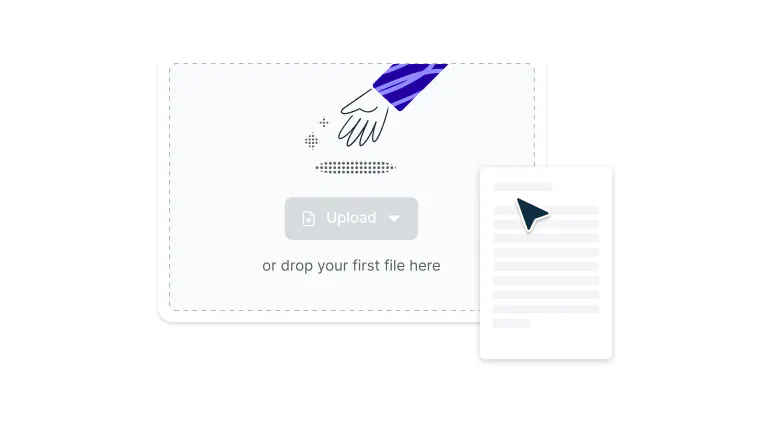
    Upload

    Drag and drop your PDF file into the dropzone above or click the ‘Select a file’ button to upload.
  • 2

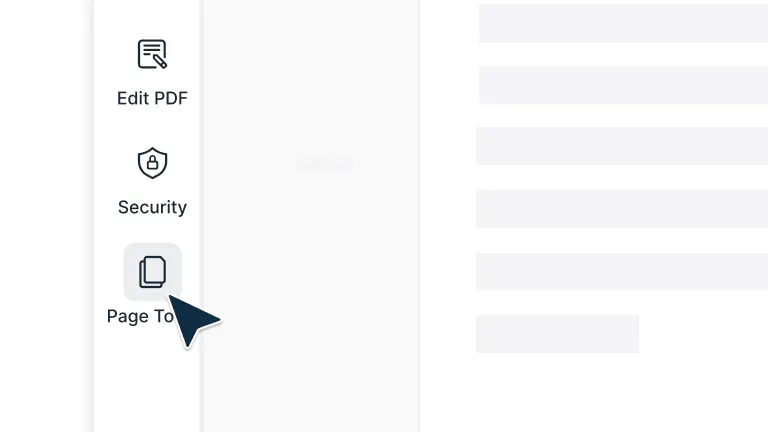
    Open Page Tools

    While you’re in Document Editing mode, click ‘Page Tools’ in the top-right toolbar to open the page management view.
  • 3

    Rearrange or Edit Pages

    Drag pages to reorder them, delete unnecessary ones, or rotate pages to perfect your document layout.
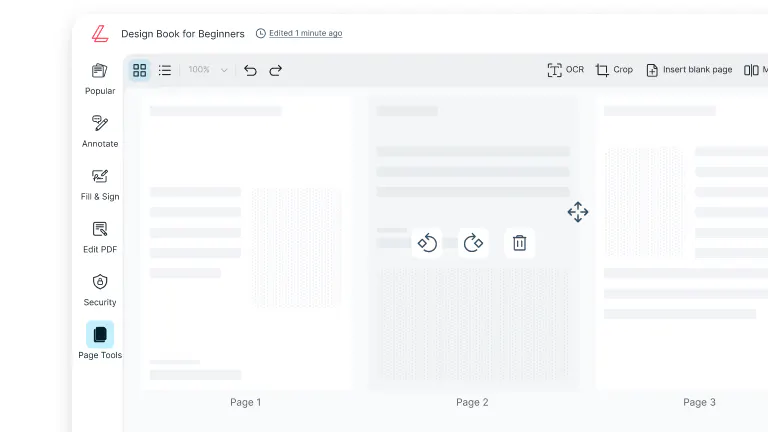
Neat and efficient page control

Keep your documents clean, organized, and easy to navigate — perfect for reports, proposals, or multi-page projects.

  • Reorder, rotate, or remove pages

    Customize your PDF exactly how you want it. Move, flip, or delete pages in just a few clicks to keep every document neat and professional.

  • Merge, split, and organize in one place

    Combine multiple PDFs, separate large files, and manage every page in a single workspace. Keep everything organized without switching between tools.

  • Effortless drag and drop controls

    Upload, rearrange, and manage your pages with ease using simple drag and drop functionality. No technical experience needed.

  • Work right from your browser

    Organize your PDFs directly in your browser, no software downloads or installations required. Just upload, edit, and save in seconds.

  • Accessible on any device

    Use Lumin on your desktop, laptop, or mobile device and enjoy a seamless PDF organizing experience wherever you are.

  • Secure every step of the way

    Once you upload your files to Lumin, they're protected with encryption and optional password protection. While stored in Lumin, your documents remain secure and under your control.

Frequently asked questions

  • Yes, it's completely free to use our PDF organizer tool. Simply upload your document and start organizing your PDF pages immediately without any cost.

  • Absolutely. When you organize PDF pages using our tool, the original quality of your document is maintained. 

    Our PDF document organizer preserves all text, images, and formatting while you reorder, rotate, or manage pages, ensuring your final organized PDF looks as professional as the original.

  • While using our PDF organize tool, select the pages you want to modify. Click the rotation icon to rotate pages 90 degrees clockwise or counterclockwise. To delete pages, select them and click the delete button. You can perform these actions multiple times throughout your PDF organization process.

  • Yes, our PDF organizer allows you to merge multiple PDFs while organizing. Upload all the PDFs you want to combine, then use the drag-and-drop PDF page organizer to arrange pages from different documents in any order. 

  • When you organize PDF files, the file size may change slightly depending on your actions. Removing pages will decrease the file size, while merging PDFs will increase it. 

    However, simply reordering or rotating pages typically has minimal impact on file size, and our PDF document organizer optimizes files to maintain efficiency.

  • Yes, Lumin’s PDF organizing tool works perfectly on mobile devices. Open the PDF page organizer from your Lumin mobile app and manage your pages anytime, anywhere with no desktop required.

  • Your security is our priority. All PDF files are protected with 256-bit AES encryption during upload, organization, and storage. Lumin is SOC 2 Type 2 compliant to keep your documents completely secure.

Trusted by more than 100 million customers

2,000+ reviews

g2trustpilotcapterra

Featured articles

A person adding new pages to a PDF document

PDF editing

• Jul 24, 2025

How to add pages to a PDF

Need to add pages to a PDF? This guide shows you how to insert blank pages or merge pages from another PDF quickly and securely.

Read more How to add pages to a PDF→
Split & Merge: how to organize classroom materials

Education

• Jul 25, 2025

Split & Merge: how to organize classroom materials

Every successful classroom requires organization, but what do you do when you need to organize a digital classroom?

Read more Split & Merge: how to organize classroom materials→
A picture of a PDF document in the shape of a lock

PDF editing

• Sep 22, 2025

How to make a PDF non-editable

Need to protect your PDF from unwanted changes? Here are four reliable methods to make your documents read-only, ranging from simple password protection to advanced flattening techniques.

Read more How to make a PDF non-editable→
Searching a PDF in Lumin

PDF editing

• Nov 17, 2025

How to search a PDF using OCR

Want to search text in your PDF? From finding specific words to locating page numbers or key sections, there are simple tools that make it quick and easy.

Read more How to search a PDF using OCR→
Multiple document pages being moved to change their order in Lumin

PDF editing

• Dec 10, 2025

How to reorder pages in a PDF

Want to reorganize the pages in your PDF? From fixing scanning mistakes to arranging reports or preparing presentations, there are simple tools that make it quick and easy.

Read more How to reorder pages in a PDF→

Discover Lumin’s products

Collaborate with existing colleagues and onboard new ones with Lumin and Lumin Sign. Our innovative solutions work great on their own, but they’re even better together.


Lumin

Lumin

An easy-to-use PDF editor that stands alone or integrates with Google Workspace.
Learn more
Lumin Sign

Lumin Sign

A digital signature workflow tool that seals deals with legally-compliant signatures.
Learn more
Lumin Sign API

Lumin Sign API

An eSignature API designed to be plugged into your platform with minimal effort.
Learn more

Lumin tools

Lumin PDF

Lumin PDF

  • Organize
    Merge PDF
    Merge PDF
    Split PDF
    Split PDF
    Delete PDF page
    Delete PDF page
    Compress PDF
    Compress PDF
    Rotate PDF
    Rotate PDF
    Organize PDF
    Organize PDF
    Extract PDF
    Extract PDF
    AI PDF
    AI PDF summarizer
    AI PDF summarizer
    Chat with PDF
    Chat with PDF
    Scan
    PDF OCR
    PDF OCR
    Scan PDF
    Scan PDF
  • Edit & annotate
    Edit PDF
    Edit PDF
    Crop PDF
    Crop PDF
    Annotate PDF
    Annotate PDF
    Edit PDF text
    Edit PDF text
    Create fillable PDF
    Create fillable PDF
    PDF reader
    PDF reader
    Redact PDF
    Redact PDF
    More
    Unlock PDF
    Unlock PDF
    Flatten PDF
    Flatten PDF
    Protect PDF
    Protect PDF
  • Convert to PDF
    PDF converter
    PDF converter
    JPG to PDF
    JPG to PDF
    PPT to PDF
    PPT to PDF
    Word to PDF
    Word to PDF
    Excel to PDF
    Excel to PDF
    PNG to PDF
    PNG to PDF
    Convert from PDF
    PDF to PNG
    PDF to PNG
    PDF to JPG
    PDF to JPG
    PDF to Word
    PDF to Word
    PDF to PPT
    PDF to PPT
    PDF to Excel
    PDF to Excel
AgreementGen

AgreementGen

  • AI agreement generator
    AI agreement generator
    AI agreement editor
    AI agreement editor
    NDA generator
    NDA generator
    Lease agreement generator
    Lease agreement generator
    Employment contract creator
    Employment contract creator
    Terms and conditions generator
    Terms and conditions generator
    Operating agreement generator
    Operating agreement generator
    Non-compete agreement generator
    Non-compete agreement generator
    Business plan generator
    Business plan generator
Lumin Sign

Lumin Sign

  • Sign PDF
    Sign PDF
  • Product

    • Lumin
    • Lumin Sign
    • AgreementGen
    • eSign API
    • Features
    • Plans & Pricing
    • Google Workspace
      Lumin for Slack
      Lumin for Chrome
      Lumin for Claude
      See all
  • Solutions

    • Streamline efficiency
    • Onboard from anywhere
    • Accelerate collaboration
    • Build relationships
    • Secure with confidence
    • Work on site
  • Learn & Discover

    • Help Center
    • Blog
    • Lumin 101
    • Customer Stories
    • Templates
    • Template categories
    • Template collections
  • Company

    • Who we are
    • Our mission
    • Careers
    • Become a partner
  • Security

    • Compliance & features
    • Personal data
    • Privacy policy
    • Terms of use
    • Status
    • Bug bounty program
  • Download

    • iOS & Android
    • Mac & Windows

    Contact

    • Support
    • Sales
    • Request a Demo
  • Contact

    • Support
    • Sales
    • Request a Demo
Google Cloud Partner

© 2014–2026 Lumin PDF Corporation | San Francisco, United States | All rights reserved

English
  • English
  • Español
  • Tiếng Việt
  • Português
  • Français