Lumin logo
  • Lumin Products
    • AgreementGen

      Your agreement drafting sidekick

    • Lumin Sign

      Simple and secure digital signing

    • Lumin PDF

      Edit, collaborate, and share PDFs

    • Lumin AI

      Supercharge your docs

    Download Apps
    API and Integrations
    • eSign API

      Seamless eSignature integration

    • Integrations

      Streamline your workflow with ease

  • AgreementGen

    • AI agreement generator

    • AI agreement editor

    • NDA generator

    • Lease agreement generator

    • Employment contract creator

    • Terms and conditions generator

    • Operating agreement generator

    • Non-compete agreement generator

    • Business plan generator

    Lumin Sign

    • Sign PDF

    Lumin PDF

    • Edit PDF

    • Edit PDF text

    • Collaboration

    • Create fillable PDF

    • Merge PDF

    • Unlock PDF

    • Integrate Google

    All tools
  • By use cases

    Streamline efficiency

    Use the cloud to reduce the burden of countless tools

    Build relationships

    Collaborate and negotiate with a few clicks

    Secure with confidence

    Comply and stay with global security standards

    Onboard from anywhere

    Automate contract admin to seal deals faster

    Accelerate collaboration

    Make teamwork seamless with a centralized suite of tools

    Work on site

    Fast-track fieldwork with offline mode for mobile

  • Discover

      Blog

      News and views on collaborative workflows

      Template Discovery

      Find, fill and sign 5,000+ free online forms

      Customer Stories

      Discover companies creating more impact with less admin

    Support

      Lumin 101

      New here?
      Learn the basics

      Help Center

      Your complete manual to Lumin and Lumin Sign

  • Enterprise
  • Pricing
  • Request a demo
Try for freeSign in
Request a demo
Sign in
Try for free

Redact PDF

Remove sensitive information from your PDFs permanently. Black out text, images, and data that you don't want others to see. Upload your document and redact online for free.

One moment...

or drop your first file here

You're in good company

costco logo
spotify logo
salesforce logo
pinterest logo
knightFrank logo
paypal logo
uber logo
costco logo
spotify logo
salesforce logo
pinterest logo
knightFrank logo
paypal logo
uber logo
costco logo
spotify logo
salesforce logo
pinterest logo
knightFrank logo
paypal logo
uber logo

How to redact a PDF

Follow these simple steps to redact information from your document.

  • 1

    Step 1

    Drop a PDF file into the dropzone above or click the 'Upload' button.
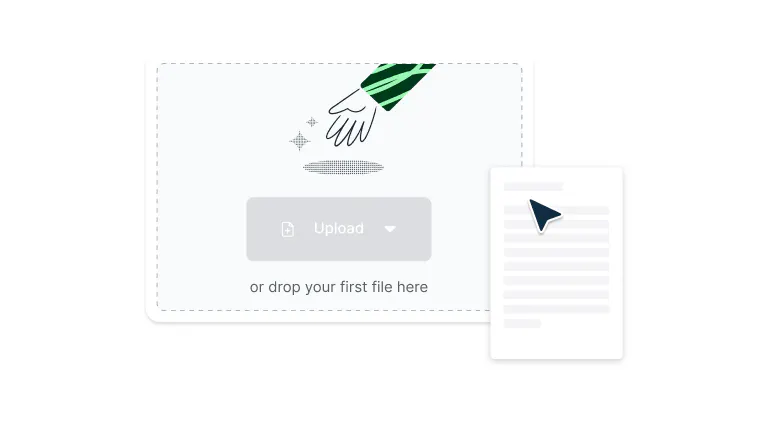
    A file being uploaded to Lumin
  • 2

    Step 2

    Select ‘Security’ and then click ‘Redact’ in the top toolbar.
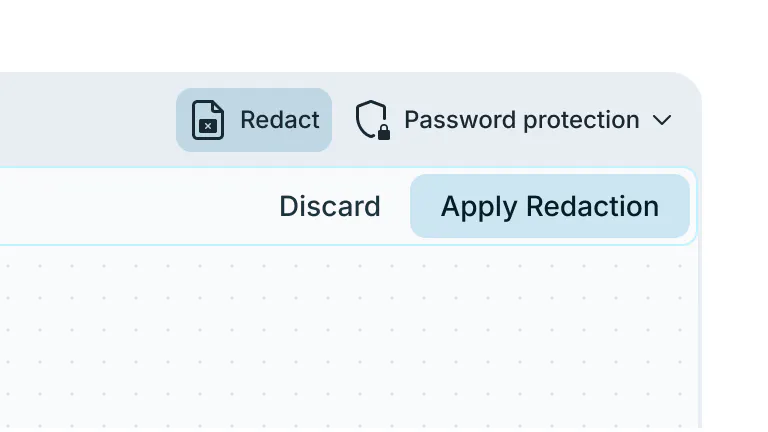
    The redaction option being selected in Lumin
  • 3

    Step 3

    Click and drag the cursor over all information you want to redact. Click ‘Apply redaction’ and then confirm to permanently remove that information.
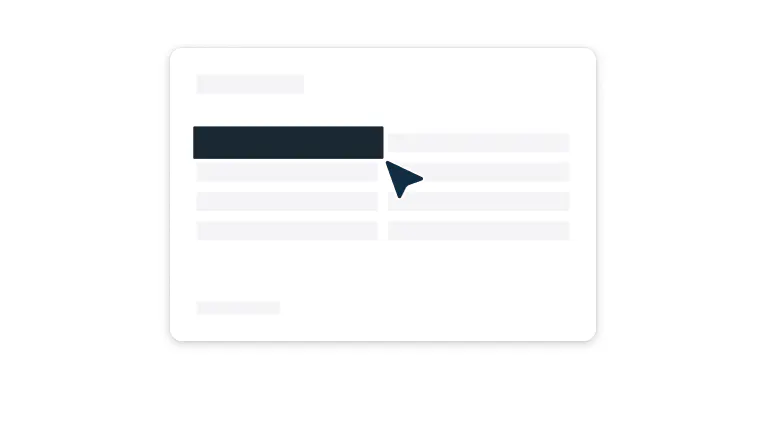
    Information being redacted from a PDF

Secure, fast, and easy PDF redaction

Everything you need to permanently remove sensitive information, all in one tool.

  • Intelligent PDF redaction

    Permanently remove sensitive information from PDFs using intelligent redaction tools that detect and eliminate text, such as names, addresses, credit card numbers, and more.

  • Intuitive drag-and-select interface

    Redact sensitive information with simple click-and-drag functionality that makes document protection accessible to users of all technical levels. Highlight text, images, or entire sections with precision, then apply redactions with a single click.

  • Business-grade security

    Your data is protected with enterprise-level encryption and privacy safeguards, ensuring your documents remain secure during upload, editing, and storage.

  • Cross-platform redaction

    Redact PDFs seamlessly across devices. Whether you’re on Mac, Windows or another operating system, you can securely redact sensitive information anywhere.

  • Make multiple redactions

    Process multiple sections of a document efficiently by highlighting and redacting different areas in sequence. Select one area, move to the next section, and continue redacting without interruption.

  • Secure collaboration

    Share redacted documents safely with team members, clients, or external parties while maintaining complete control over sensitive information.

Frequently Asked Questions

  • Yep, it’s entirely free to redact your PDF using our tool. Just upload your document to get started. 

  • Yes, you can redact on PDF documents with multiple pages. Simply navigate to each page and follow the same PDF redact process: select the redact tool, highlight the sensitive areas, and apply the redaction. The redact PDF online feature works seamlessly across all pages in your document.

  • When redacting a PDF through our platform, the information is permanently removed and cannot be recovered. 

    Unlike simple highlighting or covering text, our PDF document redaction technology ensures that sensitive data is completely eliminated from the file, providing true security for confidential information.

  • To redact a PDF online with multiple sections, follow this workflow: highlight one area and apply the redaction, then move to the next section you want to redact. 

    You can continue this process throughout the document, redacting a PDF section by section until all sensitive information is protected.

  • Yes, if you need to reverse changes after redacting a PDF, you can revert the document back to its original version using our version control feature. 

    This allows you to maintain flexibility in your PDF document redaction process while ensuring you never permanently lose important content. Find out how to revert to a previous version of your PDF in our Help Centre.

    Note that you can only reverse redactions you have made in Lumin. It’s not possible to unredact properly redacted PDFs from elsewhere.

  • Our redact PDF online platform is specifically designed for PDF files. If you have documents in other formats that need redaction, you'll need to convert them to PDF first before using our redacting PDF features.

  • No download required! Our redact PDF online tool works entirely in your web browser. You can access all PDF document redaction features directly online without installing any software, making it convenient to redact PDF files from any device with internet access.

  • Yes, redacting a PDF on our platform is completely secure. We use enterprise-grade encryption and security protocols to protect your documents during the redaction process. 

    Your files and the redact PDF online process are safeguarded with the same security standards used by businesses and organizations handling sensitive information.

  • Our redact PDF online platform supports secure collaboration. Team members can work together on PDF document redaction projects with role-based permissions, version control, and encrypted sharing to ensure sensitive information remains protected throughout the collaborative PDF redacting process.

Trusted by more than 100 million customers

2,000+ reviews

g2trustpilotcapterra

Featured Articles

A PDF being edited with AI tools.

PDF editing

• Aug 15, 2025

How to edit PDFs with AI: Work smarter, not harder

AI has transformed PDF editing, making complex tasks quick and effortless. Learn how to use AI to update text, annotate, summarize, redact, and organize your documents in a fraction of the time.

Read more How to edit PDFs with AI: Work smarter, not harder→
How to secure online documents

PDF editing

• Nov 2, 2021

How to secure online documents

Security breaches and data leaks can harm or even destroy a company's brand. Here are some simple processes you can follow to keep your documents and sensitive information safe.

Read more How to secure online documents→
How to unlock a password-protected PDF

PDF editing

• Nov 19, 2025

How to unlock a password-protected PDF

Password protecting your PDFs is one the best ways to ensure security. But what happens when you're tired of unlocking the same PDF every day? There's a solution.

Read more How to unlock a password-protected PDF→
A locked PDF being made editable

PDF editing

• Aug 5, 2025

How to make a PDF editable

Need to update a PDF? You can make changes like editing text, filling in forms, or adjusting the layout without expensive software.

Read more How to make a PDF editable→
PDF file showing text redaction for privacy

PDF editing

• Dec 29, 2025

How to redact a PDF

Removing sensitive information from a PDF before you share it is a common task when working with legal documents, financial records, or personal data. Proper redaction protects confidential details and ensures the file stays private.

Read more How to redact a PDF→

Discover Lumin’s products

Collaborate with existing colleagues and onboard new ones with Lumin and Lumin Sign. Our innovative solutions work great on their own, but they’re even better together.


Lumin

Lumin

An easy-to-use PDF editor that stands alone or integrates with Google Workspace.
Learn more
Lumin Sign

Lumin Sign

A digital signature workflow tool that seals deals with legally-compliant signatures.
Learn more
Lumin Sign API

Lumin Sign API

An eSignature API designed to be plugged into your platform with minimal effort.
Learn more

Lumin tools

Lumin PDF

Lumin PDF

  • Organize
    Merge PDF
    Merge PDF
    Split PDF
    Split PDF
    Delete PDF page
    Delete PDF page
    Compress PDF
    Compress PDF
    Rotate PDF
    Rotate PDF
    Organize PDF
    Organize PDF
    Extract PDF
    Extract PDF
    AI PDF
    AI PDF summarizer
    AI PDF summarizer
    Chat with PDF
    Chat with PDF
    Scan
    PDF OCR
    PDF OCR
    Scan PDF
    Scan PDF
  • Edit & annotate
    Edit PDF
    Edit PDF
    Crop PDF
    Crop PDF
    Annotate PDF
    Annotate PDF
    Edit PDF text
    Edit PDF text
    Create fillable PDF
    Create fillable PDF
    PDF reader
    PDF reader
    Redact PDF
    Redact PDF
    More
    Unlock PDF
    Unlock PDF
    Flatten PDF
    Flatten PDF
    Protect PDF
    Protect PDF
  • Convert to PDF
    PDF converter
    PDF converter
    JPG to PDF
    JPG to PDF
    PPT to PDF
    PPT to PDF
    Word to PDF
    Word to PDF
    Excel to PDF
    Excel to PDF
    PNG to PDF
    PNG to PDF
    Convert from PDF
    PDF to PNG
    PDF to PNG
    PDF to JPG
    PDF to JPG
    PDF to Word
    PDF to Word
    PDF to PPT
    PDF to PPT
    PDF to Excel
    PDF to Excel
AgreementGen

AgreementGen

  • AI agreement generator
    AI agreement generator
    AI agreement editor
    AI agreement editor
    NDA generator
    NDA generator
    Lease agreement generator
    Lease agreement generator
    Employment contract creator
    Employment contract creator
    Terms and conditions generator
    Terms and conditions generator
    Operating agreement generator
    Operating agreement generator
    Non-compete agreement generator
    Non-compete agreement generator
    Business plan generator
    Business plan generator
Lumin Sign

Lumin Sign

  • Sign PDF
    Sign PDF
  • Product

    • Lumin
    • Lumin Sign
    • AgreementGen
    • eSign API
    • Features
    • Plans & Pricing
    • Google Workspace
      Lumin for Slack
      Lumin for Chrome
      Lumin for Claude
      See all
  • Solutions

    • Streamline efficiency
    • Onboard from anywhere
    • Accelerate collaboration
    • Build relationships
    • Secure with confidence
    • Work on site
  • Learn & Discover

    • Help Center
    • Blog
    • Lumin 101
    • Customer Stories
    • Templates
    • Template categories
    • Template collections
  • Company

    • Who we are
    • Our mission
    • Careers
    • Become a partner
  • Security

    • Compliance & features
    • Personal data
    • Privacy policy
    • Terms of use
    • Status
    • Bug bounty program
  • Download

    • iOS & Android
    • Mac & Windows

    Contact

    • Support
    • Sales
    • Request a Demo
  • Contact

    • Support
    • Sales
    • Request a Demo
Google Cloud Partner

© 2014–2026 Lumin PDF Corporation | San Francisco, United States | All rights reserved

English
  • English
  • Español
  • Tiếng Việt
  • Português
  • Français