Lumin logo
  • Lumin Products
    • AgreementGen

      Your agreement drafting sidekick

    • Lumin Sign

      Simple and secure digital signing

    • Lumin PDF

      Edit, collaborate, and share PDFs

    • Lumin AI

      Supercharge your docs

    Download Apps
    API and Integrations
    • eSign API

      Seamless eSignature integration

    • Integrations

      Streamline your workflow with ease

  • AgreementGen

    • AI agreement generator

    • AI agreement editor

    • NDA generator

    • Lease agreement generator

    • Employment contract creator

    • Terms and conditions generator

    • Operating agreement generator

    • Non-compete agreement generator

    • Business plan generator

    Lumin Sign

    • Sign PDF

    Lumin PDF

    • Edit PDF

    • Edit PDF text

    • Collaboration

    • Create fillable PDF

    • Merge PDF

    • Unlock PDF

    • Integrate Google

    All tools
  • By use cases

    Streamline efficiency

    Use the cloud to reduce the burden of countless tools

    Build relationships

    Collaborate and negotiate with a few clicks

    Secure with confidence

    Comply and stay with global security standards

    Onboard from anywhere

    Automate contract admin to seal deals faster

    Accelerate collaboration

    Make teamwork seamless with a centralized suite of tools

    Work on site

    Fast-track fieldwork with offline mode for mobile

  • Discover

      Blog

      News and views on collaborative workflows

      Template Discovery

      Find, fill and sign 5,000+ free online forms

      Customer Stories

      Discover companies creating more impact with less admin

    Support

      Lumin 101

      New here?
      Learn the basics

      Help Center

      Your complete manual to Lumin and Lumin Sign

  • Enterprise
  • Pricing
  • Request a demo
Try for freeSign in
Request a demo
Sign in
Try for free

Scan to PDF: Turn any document into a PDF

Open Lumin AppCapture clear PDFs using just your phone's camera. Turn any document or image into a professional-quality PDF with the Lumin mobile app.


A QR code to download the Lumin mobile app
Download our mobile app
App StoreGoogle Play Store

You're in good company

costco logo
spotify logo
salesforce logo
pinterest logo
knightFrank logo
paypal logo
uber logo
costco logo
spotify logo
salesforce logo
pinterest logo
knightFrank logo
paypal logo
uber logo
costco logo
spotify logo
salesforce logo
pinterest logo
knightFrank logo
paypal logo
uber logo

How to scan your document into a PDF

  • 1

    Step 1

    Open the Lumin mobile app for Android or iOS and click the red ‘plus’ button and select ‘Scan document’
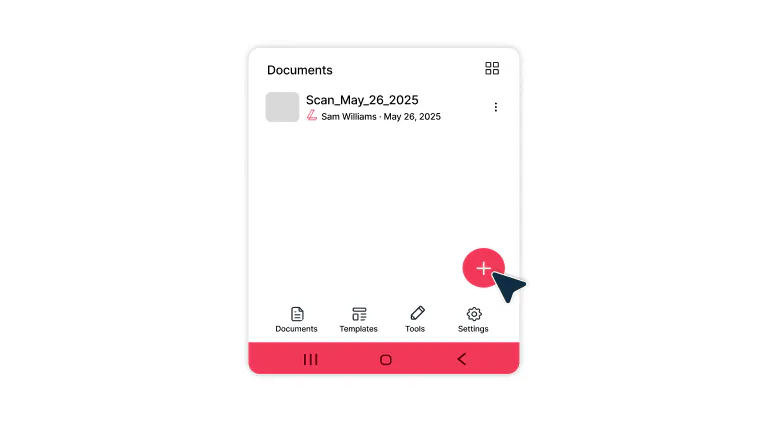
    Opening the scan feature on the Lumin mobile app
  • 2

    Step 2

    Take a photo of the document and crop the scan window to fit the document.
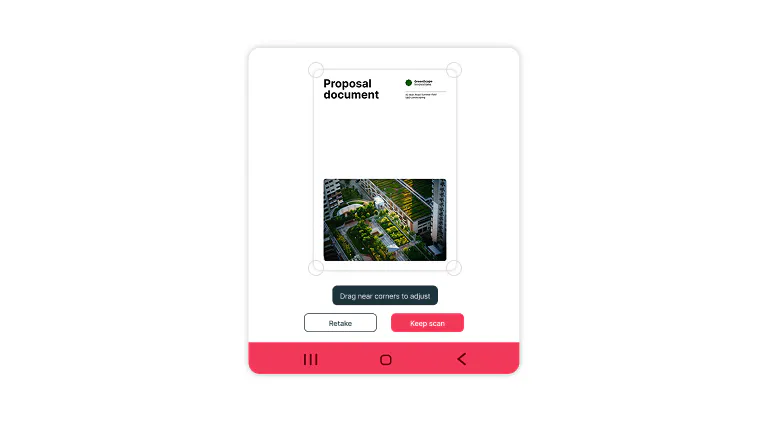
    Scanning a document using the Lumin mobile app
  • 3

    Step 3

    Scan again to add more PDF pages or tap ‘Save’ to finish.
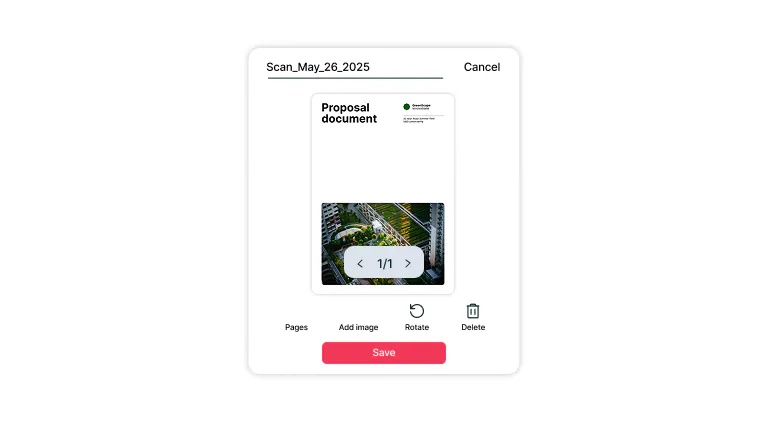
    Saving a scanned document

Everything you need to scan smarter

Turn your phone into a powerful scanner with features that make every PDF editable, secure, and easy to share.

  • Instant document scanning

    Scan to PDF using your phone and instantly access the documents on your desktop, without cables, email attachments, or manual uploads. Your scanned PDFs automatically appear across all your synced devices.

  • Scan from any mobile device

    Turn your iPhone or Android into a powerful scan-to-PDF tool that creates high-quality, professional-looking documents. Automatically detect page edges, enhance image clarity, and organize multi-page scans with ease.

  • Smart OCR recognition

    Convert any scanned PDF into a fully editable, searchable document using advanced optical character recognition (OCR) technology. Copy and edit text without retyping, locate information in seconds, and make scanned files fully functional.

  • Professional annotation tools

    Add highlights, annotations, comments, and text to any scanned PDF using built-in markup tools. Whether you're reviewing legal contracts, updating team reports, or giving visual feedback, these editing features turn static documents into interactive workspaces.

  • Work anywhere, sync everything

    Access your entire scanned PDF library even when offline, and sync it automatically when you reconnect. Whether you're on a flight, in a remote location, or just without Wi-Fi, your scanned documents stay available and ready to use.

  • Enhanced security for PDF protection

    Protect your scanned PDF files with enterprise-grade encryption and secure cloud backup. Share documents and sensitive data confidently, knowing advanced security measures and strict privacy controls protect your files.

Frequently asked questions

  • Lumin automatically syncs your scanned PDFs across all devices when you're signed into your account. Files are securely stored in the cloud, allowing instant access from any smartphone, tablet, or computer.

    Simply log in to your Lumin account on any device to view, edit, and share your scanned documents seamlessly.

  • Lumin's advanced OCR (optical character recognition) technology automatically enhances the quality of your scanned PDF by optimizing text clarity and image resolution.

    For best results when you scan a document to PDF, ensure good lighting, hold your device steady, and use auto-crop. You can also edit scanned PDF files afterward with enhanced text recognition and searchability.

  • Download the Lumin app from Google Play Store, open it, and tap the scan icon.

    Position your Android camera over the document to scan as PDF, ensuring it's well-lit and flat. The app automatically detects edges and captures your scan in PDF format.

    You can adjust borders, apply filters, and create searchable scanned PDF files with built-in OCR technology.

  • Install Lumin from the App Store, launch the app, and select the scan function. Lumin automatically detects boundaries and optimizes the image.

    The app provides editing tools for cropping, rotating, and enhancing before converting to scan PDF iPhone format with searchable OCR technology.

  • Yes, Lumin can convert existing photos from your camera roll into high-quality PDFs. The app automatically detects document boundaries, corrects perspective distortion, and enhances readability.

    This works excellently for whiteboard photos, handwritten notes, receipts, and any paper documents you've previously photographed, making them searchable with OCR.

  • Absolutely! Lumin's scanner easily captures business cards and converts them to scanned PDF format. The OCR technology can extract contact information, making it searchable and editable.

    You can organize business cards into folders, share them digitally, or export contact details to your phone's address book for seamless networking management.

  • Yes, Lumin offers a free tier with basic scanning and OCR capabilities.

    Lumin Pro unlocks advanced features including text highlighting, underlining, strikethrough, adding images/shapes, creating fillable PDFs, merging documents, unlocking password-protected files, unlimited e-signatures, and raw PDF text editing.

    Upgrade to Pro for comprehensive PDF management and collaboration tools.

  • Yes, Lumin prioritizes your document security with enterprise-grade encryption and secure cloud storage.

    All scanned files are protected during transmission and storage. The app complies with industry security standards, ensuring your sensitive documents remain private and accessible only to you through your secure account login.

    Learn more about how Lumin keeps your data safe.

Trusted by more than 100 million customers

2,000+ reviews

g2trustpilotcapterra

Related PDF guides

A PDF being edited with AI tools.

PDF editing

• Aug 15, 2025

How to edit PDFs with AI: Work smarter, not harder

AI has transformed PDF editing, making complex tasks quick and effortless. Learn how to use AI to update text, annotate, summarize, redact, and organize your documents in a fraction of the time.

Read more How to edit PDFs with AI: Work smarter, not harder→
A picture being converted to a PDF on an iPhone

PDF editing

• Aug 7, 2025

How to turn your pictures into PDFs on iPhone

Need to save photos as PDFs on your iPhone? This guide walks you through the easiest ways to convert images into PDFs using your iPhone’s native features or free apps.

Read more How to turn your pictures into PDFs on iPhone→
A PDF document being converted to a Word doc.

PDF editing

• Aug 7, 2025

How to convert PDFs to Google Docs

We show you how to convert a PDF to a Google Doc using two free methods, plus how to fix or avoid formatting problems along the way.

Read more How to convert PDFs to Google Docs→
A word document being converted to JPG

PDF editing

• Jul 18, 2025

How to convert Word documents to JPG

Need to turn a Word document into a JPG image? Converting your Word files to JPG images is perfect for presentations, web uploads, or preserving formatting when sharing with clients. Since Word doesn't make this simple, we've streamlined the process for you.

Read more How to convert Word documents to JPG→
How to convert Google Docs to PDF

PDF editing

• Aug 7, 2025

How to convert Google Docs to PDF

Need a reliable way to save your Google Doc as a proper PDF? Here’s how to do it right, on any device.

Read more How to convert Google Docs to PDF→
Searching a PDF in Lumin

PDF editing

• Nov 17, 2025

How to search a PDF using OCR

Want to search text in your PDF? From finding specific words to locating page numbers or key sections, there are simple tools that make it quick and easy.

Read more How to search a PDF using OCR→

Lumin tools

Lumin PDF

Lumin PDF

  • Organize
    Merge PDF
    Merge PDF
    Split PDF
    Split PDF
    Delete PDF page
    Delete PDF page
    Compress PDF
    Compress PDF
    Rotate PDF
    Rotate PDF
    Organize PDF
    Organize PDF
    Extract PDF
    Extract PDF
    AI PDF
    AI PDF summarizer
    AI PDF summarizer
    Chat with PDF
    Chat with PDF
    Scan
    PDF OCR
    PDF OCR
    Scan PDF
    Scan PDF
  • Edit & annotate
    Edit PDF
    Edit PDF
    Crop PDF
    Crop PDF
    Annotate PDF
    Annotate PDF
    Edit PDF text
    Edit PDF text
    Create fillable PDF
    Create fillable PDF
    PDF reader
    PDF reader
    Redact PDF
    Redact PDF
    More
    Unlock PDF
    Unlock PDF
    Flatten PDF
    Flatten PDF
    Protect PDF
    Protect PDF
  • Convert to PDF
    PDF converter
    PDF converter
    JPG to PDF
    JPG to PDF
    PPT to PDF
    PPT to PDF
    Word to PDF
    Word to PDF
    Excel to PDF
    Excel to PDF
    PNG to PDF
    PNG to PDF
    Convert from PDF
    PDF to PNG
    PDF to PNG
    PDF to JPG
    PDF to JPG
    PDF to Word
    PDF to Word
    PDF to PPT
    PDF to PPT
    PDF to Excel
    PDF to Excel
AgreementGen

AgreementGen

  • AI agreement generator
    AI agreement generator
    AI agreement editor
    AI agreement editor
    NDA generator
    NDA generator
    Lease agreement generator
    Lease agreement generator
    Employment contract creator
    Employment contract creator
    Terms and conditions generator
    Terms and conditions generator
    Operating agreement generator
    Operating agreement generator
    Non-compete agreement generator
    Non-compete agreement generator
    Business plan generator
    Business plan generator
Lumin Sign

Lumin Sign

  • Sign PDF
    Sign PDF
  • Product

    • Lumin
    • Lumin Sign
    • AgreementGen
    • eSign API
    • Features
    • Plans & Pricing
    • Google Workspace
      Lumin for Slack
      Lumin for Chrome
      Lumin for Claude
      See all
  • Solutions

    • Streamline efficiency
    • Onboard from anywhere
    • Accelerate collaboration
    • Build relationships
    • Secure with confidence
    • Work on site
  • Learn & Discover

    • Help Center
    • Blog
    • Lumin 101
    • Customer Stories
    • Templates
    • Template categories
    • Template collections
  • Company

    • Who we are
    • Our mission
    • Careers
    • Become a partner
  • Security

    • Compliance & features
    • Personal data
    • Privacy policy
    • Terms of use
    • Status
    • Bug bounty program
  • Download

    • iOS & Android
    • Mac & Windows

    Contact

    • Support
    • Sales
    • Request a Demo
  • Contact

    • Support
    • Sales
    • Request a Demo
Google Cloud Partner

© 2014–2026 Lumin PDF Corporation | San Francisco, United States | All rights reserved

English
  • English
  • Español
  • Tiếng Việt
  • Português
  • Français