
Does Salesforce have an eSignature feature? Here's how to add one

Salesforce is powerful for managing customers and sales, but it stops short when contracts need signing. We look at how an eSignature integration can close that gap.
4 [{"lang":"pt-pt","url":"/pt/blog/salesforce-tem-um-recurso-de-assinatura-eletronica/"},{"lang":"fr-fr","url":"/fr/blog/salesforce-a-t-il-une-fonctionnalite-de-signature-electronique/"},{"lang":"es-es","url":"/es/blog/salesforce-tiene-una-funcion-de-firma-electronica/"},{"lang":"vi","url":"/vi/blog/salesforce-co-tinh-nang-chu-ky-dien-tu-khong/"}]You can also read this article in Português, Français, Español and Tiếng Việt.
Table of contents
- 1. Does Salesforce have a built-in eSignature feature?
- 2. Why you need eSignature integration with Salesforce
- 3. Add eSignature capabilities to Salesforce with Lumin Sign
- 4. Summary
Share this post
Salesforce is awesome for tracking customers and deals, but it falls short when contracts need signing. Surprisingly, the platform lacks native eSignature functionality, causing some workflows to take much longer than they really should.
This is where eSignature integrations for Salesforce come in. These apps plug directly into the CRM, letting you send, sign and track legal agreements and other documents without leaving the platform. The result? Deals keep moving, approvals happen faster and you don't have to waste time chasing down signatures.
Does Salesforce have a built-in eSignature feature?
The answer is no. Salesforce is built to manage customer relationships, deals and sales pipelines, but it doesn't allow you to collect or track legally binding digital signatures — at least not natively.
Until fairly recently, users had no choice but to switch platforms when gathering eSignatures, which adds extra steps, delays approvals and creates friction when closing deals. Even now, some teams have to juggle several pieces of software just to get a document signed, turning what should be a simple task into a real slog.
The good news is that there are now apps and integrations that bring eSignatures to Salesforce, making things easier for your team.
Why you need eSignature integration with Salesforce
Put simply, managing contracts and signatures outside of Salesforce is a pain. Every time you leave the platform to get a document signed, you're just creating unnecessary steps and slowing things down.
Here are some of the biggest headaches your team might face without Salesforce eSignature integration:
- Jumping between apps: Switching between your CRM and a standalone eSignature tool wastes time and breaks your workflow.
- Manual data entry errors: Copying and pasting information from Salesforce to a separate eSignature tool, and vice versa, increases the likelihood of mistakes.
- Delayed deals: When contracts sit in a tool outside Salesforce, deals can stall. You'll have to leave your CRM, chase signatures elsewhere and hope nothing falls through the cracks.
- No real-time updates: Salesforce doesn't automatically know the status of contracts in another tool. Without integration, you lack real-time visibility into deals, approvals and sales pipelines.
That said, not all eSignature integrations with Salesforce are created equal. Some enterprise-grade solutions may connect directly with the platform, letting you collect and manage digital signatures without switching tools. However, they are often clunky and difficult to set up, causing an extra layer of complexity you don't need.
Thankfully, there's a solution that keeps everything simple.
Add eSignature capabilities to Salesforce with Lumin Sign
Lumin Sign's native, no-fuss Salesforce app is built specifically for SMBs. It lets you collect, track and manage eSignatures entirely within Salesforce, so you never have to leave the platform.
Here's what you need to know:
Ease of use
Unlike enterprise solutions, there's no complicated coding, setup, or ongoing maintenance. Basically, you're up and running in minutes. Just download the Lumin Sign for Salesforce app from the AppExchange, and you're good to go.
Features
Lumin Sign offers enterprise-level features without the enterprise-level complexity. From world-class security to real-time tracking and complete visibility, it gives you all the tools you need to generate contracts, collect signatures and close deals.
You can even create contracts from templates that automatically populate customer names, deal amounts and other data from Salesforce, which saves time and reduces errors.
Cost
Lumin Sign for Salesforce costs from just $18 (USD) per user per month, making it a more affordable option than most enterprise solutions. Plus, there are no hidden fees or complicated contracts.
You can always sign up for a free 14-day trial to see whether it's right for your team.
Comparison with competitors
Here's a table showing how Lumin Sign for Salesforce ranks against other Salesforce eSignature solutions:
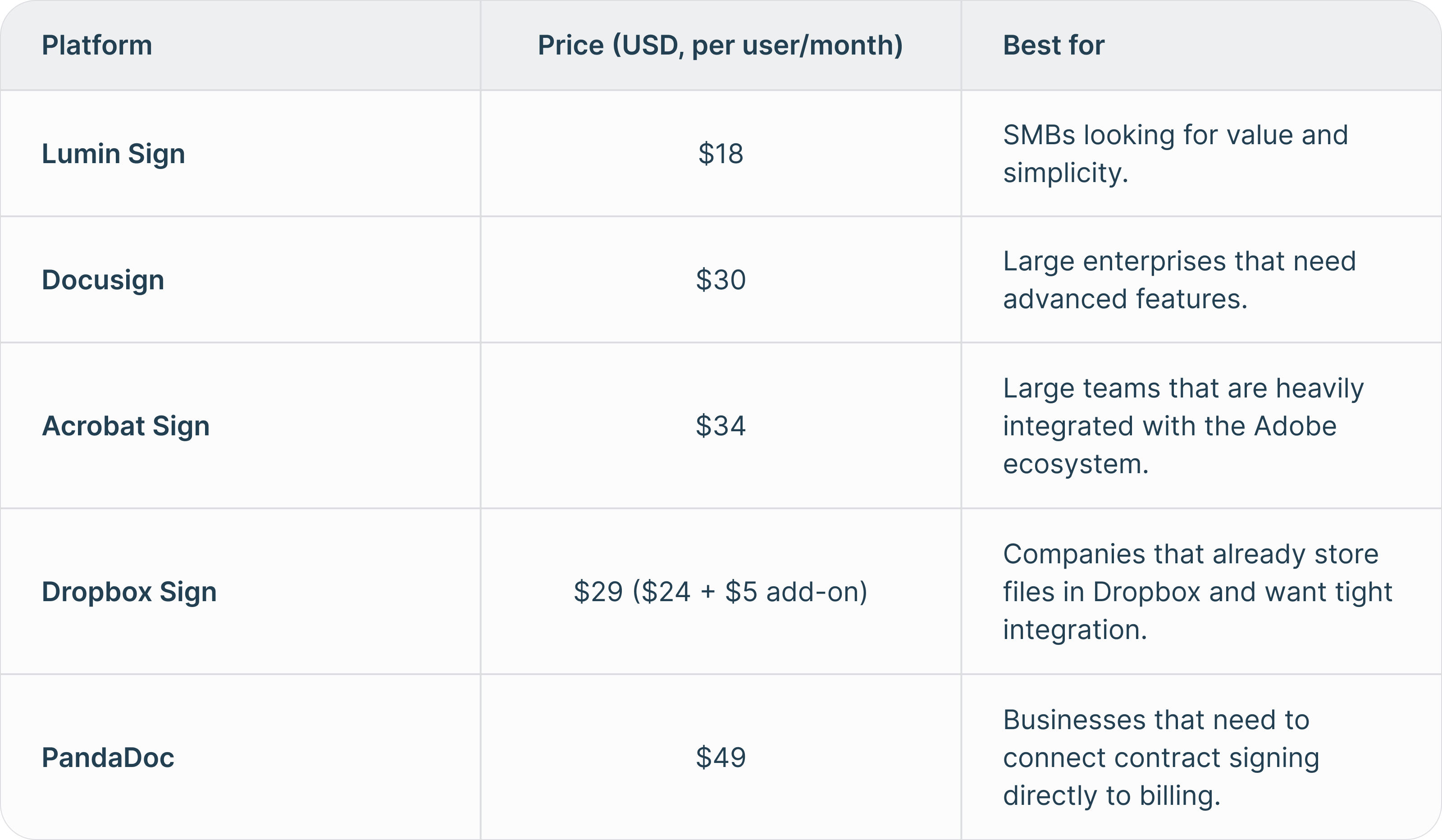
Learn more about how the Lumin Sign integration for Salesforce stacks up against the competition.
Summary
Though Salesforce doesn't have any native eSignature capabilities, adding them doesn't have to be a hassle. With Lumin Sign, you can do everything you need to do right where you manage customers, making life so much easier. This native, cost-effective solution keeps deals moving, simplifying every step from contract creation through to signing.
Want to send, sign and close with ease? Start your 14-day free trial of Lumin Sign for Salesforce and streamline contract management today.
Meet our author

Share this post