
Giải pháp eSignature tốt nhất cho Salesforce – So sánh dành cho doanh nghiệp vừa và nhỏ

Salesforce không bao gồm sẵn công cụ eSignature, trong khi nhiều tiện ích bổ sung lại quá phức tạp hoặc đắt đỏ với các doanh nghiệp đang phát triển. Chúng tôi so sánh năm tích hợp Salesforce hàng đầu để bạn chọn ra giải pháp phù hợp cho đội nhóm của mình.
Mục lục
- 1. So sánh nhanh
- 2. Lumin Sign
- 3. Docusign
- 4. Acrobat Sign
- 5. Dropbox Sign
- 6. PandaDoc
- 7. Cách chọn ứng dụng eSigning phù hợp tích hợp với Salesforce
Chia sẻ bài viết này
Với các doanh nghiệp đang phát triển như của bạn, Salesforce là nơi mọi điều kỳ diệu diễn ra – các đội nhóm có thể theo dõi khách hàng tiềm năng, chốt hợp đồng và duy trì dòng tiền. Nhưng khi đến lúc ký hợp đồng, mọi thứ lại trở nên rắc rối. Salesforce không có sẵn khả năng eSignature, buộc quản trị viên phải rời khỏi nền tảng và sử dụng một công cụ riêng biệt. Tệ hơn, nhiều công cụ này lại khó sử dụng, giá cao và đồng bộ hóa không ổn định.
Các công cụ eSignature cho doanh nghiệp lớn có thể đáp ứng nhu cầu, nhưng chúng lại chủ yếu dành cho các tổ chức quy mô lớn, không phải các đội nhóm nhỏ, và thường đi kèm nhiều tính năng mà bạn sẽ chẳng bao giờ động tới. Thêm vào đó, chúng còn nổi tiếng là khó học, biến thao tác 'ký tại đây' vốn đơn giản thành một cơn đau đầu thực sự.
Dưới đây là năm nền tảng tích hợp rất tốt với Salesforce. Mặc dù tất cả đều quảng bá dành cho doanh nghiệp vừa và nhỏ, một số có thể vẫn quá phức tạp so với nhu cầu của bạn, vì vậy hãy cân nhắc kỹ từng lựa chọn!
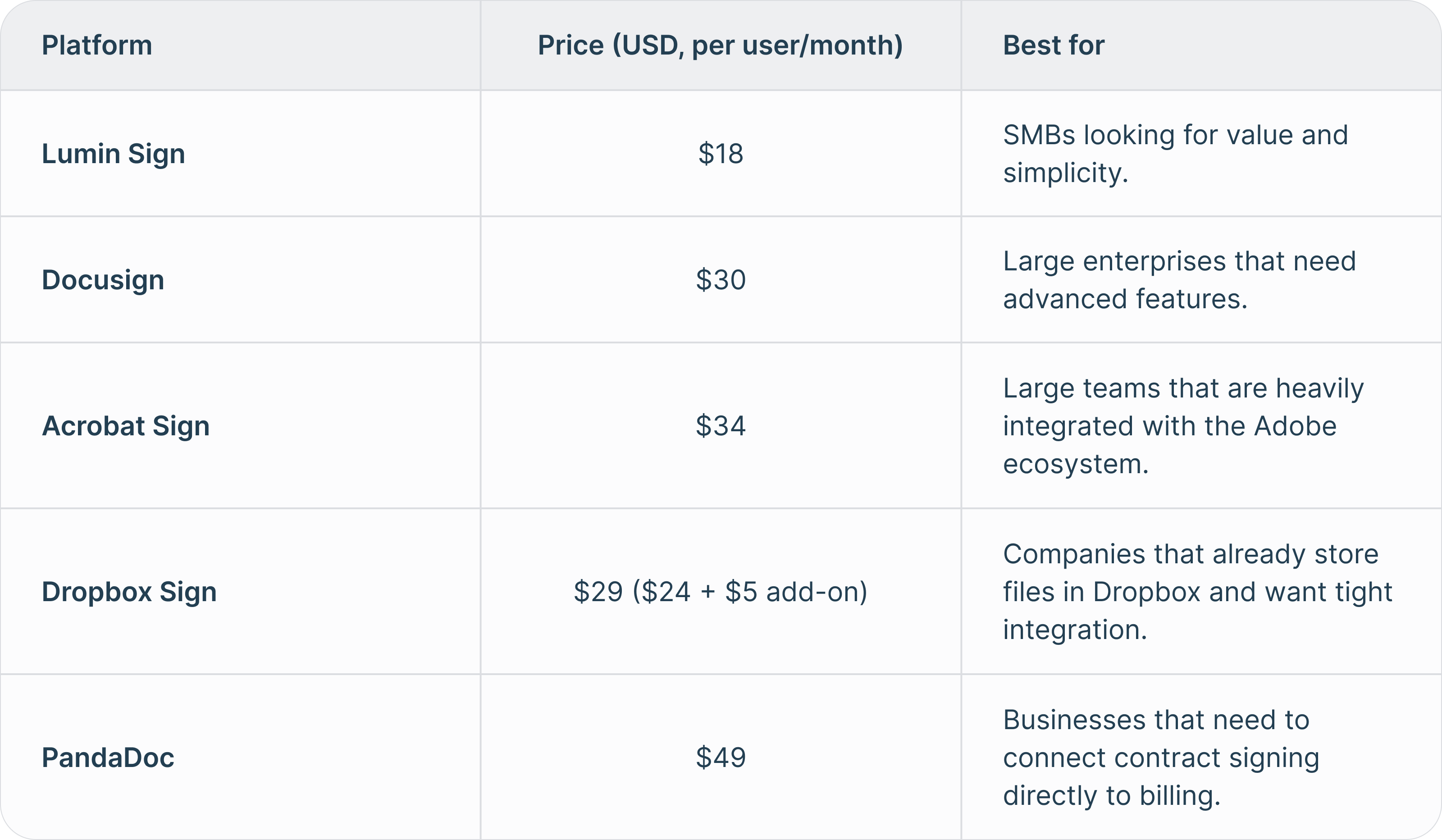
So sánh nhanh
Lumin Sign
Lumin Sign cho Salesforce là một ứng dụng Salesforce được thiết kế dành riêng cho doanh nghiệp vừa và nhỏ, giúp bạn thu thập và quản lý chữ ký điện tử hợp pháp ngay trên CRM mà không phải chuyển đổi nền tảng. Bạn có thể cài đặt ứng dụng từ Salesforce AppExchange và sử dụng chỉ sau vài phút – thật tuyệt vì không cần viết mã, sử dụng API hay phải bảo trì thường xuyên.
Điểm mạnh
Nếu bạn đang tìm kiếm các tính năng eSigning cấp doanh nghiệp nhưng không kèm sự phức tạp hay mức giá cao, ứng dụng Lumin Sign cho Salesforce chắc chắn đáp ứng được. Ví dụ, bạn có thể tạo hợp đồng và các thỏa thuận pháp lý khác từ mẫu có sẵn, tự động điền tên khách hàng, giá trị giao dịch, v.v. Sau đó gửi các tài liệu này cho bất kỳ ai chỉ trong vài giây và theo dõi tất cả diễn biến theo thời gian thực, bao gồm cả việc khi nào hợp đồng được mở, xem và ký.
Điểm tuyệt vời của tích hợp này là bạn không phải rời khỏi Salesforce, và người nhận hợp đồng có thể ký trên bất kỳ thiết bị nào mà không cần tạo tài khoản hay đăng nhập. Bạn cũng được bảo vệ bằng bảo mật đạt chuẩn doanh nghiệp, bao gồm mã hóa dữ liệu và tuân thủ SOC 2 Type 2.
Bạn có thể bắt đầu sử dụng Lumin Sign cho Salesforce chỉ từ $18 (USD) cho mỗi người dùng mỗi tháng. Mức giá này rẻ hơn đáng kể so với hầu hết các lựa chọn khác trong danh sách này.
Điểm yếu
Có một số việc bạn chưa thể làm với ứng dụng Lumin Sign cho Salesforce, như chỉnh sửa PDF hoặc tạo thỏa thuận mới ngay bên trong nền tảng. Tuy nhiên, để xử lý các tác vụ này, bạn có thể sử dụng các công cụ quản lý tài liệu khác của Lumin như Lumin PDF và AgreementGen.
Giá
Tích hợp Lumin Sign với Salesforce có giá từ $18 mỗi người dùng/tháng.
Docusign
Docusign là nhà dẫn đầu thị trường eSigning và có ứng dụng riêng giúp bạn thu thập, quản lý và theo dõi chữ ký điện tử ngay trong Salesforce.
Điểm mạnh
Tương tự như Lumin Sign, Docusign cho phép bạn tạo hợp đồng từ mẫu, gửi đi ký và theo dõi toàn bộ tiến trình tại một nơi. Điều này giúp tiết kiệm thời gian và ký nhanh các hợp đồng quan trọng mà không cần viết mã.
Bạn sẽ tìm thấy nhiều tính năng cấp doanh nghiệp hơn trên ứng dụng Salesforce của Docusign so với Lumin Sign. Tuy nhiên, nếu bạn chỉ cần các tính năng eSignature cơ bản, bạn có thể sẽ phải trả thêm tiền cho những gì không thực sự dùng đến.
Muốn dùng thử trước khi mua? Docusign cho Salesforce cung cấp gói dùng thử miễn phí 30 ngày – dài hơn so với Lumin Sign.
Điểm yếu
Do ứng dụng Docusign có nhiều tính năng nâng cao nên có thể sẽ khó sử dụng với đội ngũ của bạn. Ngoài ra, giao diện của nó không thân thiện như Lumin Sign; một số người dùng nhận xét bố cục hơi lộn xộn, khó tìm công cụ cần thiết.
Tích hợp Docusign cũng đắt hơn nhiều so với Lumin Sign, lại còn có các khoản phí bổ sung để mở khóa tính năng, khiến tổng chi phí có thể tăng lên tùy vào nhu cầu sử dụng. Một số đánh giá còn cho rằng ứng dụng này liên tục “mời chào” mua thêm tính năng, gây khó chịu và tốn kém cho doanh nghiệp vừa và nhỏ.
Giá
Tích hợp Docusign eSignature với Salesforce có giá $30/người dùng/tháng cho các tính năng cơ bản.
Acrobat Sign
Acrobat Sign của Adobe cũng có ứng dụng Salesforce riêng để gửi, ký và theo dõi hợp đồng ngay trên Salesforce.
Điểm mạnh
Acrobat Sign được thiết kế nhằm đơn giản hóa quy trình eSigning, cung cấp mẫu tùy chỉnh, lịch sử hợp đồng theo thời gian thực, cùng thông báo khi tài liệu được xem, ký, hủy hoặc từ chối.
Bạn cũng có thêm các báo cáo và phân tích nâng cao, cùng nút 'Gửi để ký' một chạm giúp rút ngắn thao tác gửi từ bất kỳ đối tượng Salesforce nào.
Một lợi ích lớn khác của Acrobat Sign là khai thác khả năng bảo mật hàng đầu thế giới của Adobe, mang lại sự yên tâm về tính an toàn và tuân thủ cho hợp đồng.
Thêm một điểm cộng là Adobe cung cấp nhiều hướng dẫn sử dụng và tài liệu, giúp dễ dàng tiếp cận một số tính năng nhất định.
Điểm yếu
Như bạn thấy, ứng dụng Acrobat Sign có rất nhiều tính năng. Tuy nhiên, điều này cũng khiến nó trở nên khó dùng hơn với doanh nghiệp vừa và nhỏ mới làm quen eSigning. Ví dụ, có các tính năng bạn không thực sự cần như ký điện tử bằng hơn 20 ngôn ngữ và gửi tài liệu qua fax từ nhiều vị trí. Cuối cùng, nhiều tự động hóa quy trình của nó dành riêng cho doanh nghiệp lớn, có thể là quá tải với đội nhóm nhỏ.
Bạn cũng có thể gặp vấn đề khi cài đặt. Acrobat Sign cho Salesforce chạy trên trình duyệt web, nhưng Adobe cảnh báo Microsoft Edge có thể khiến một số tính năng hoạt động không như mong đợi. Điều đó nghĩa là bạn nên dùng Google Chrome, Firefox hoặc trình duyệt khác.
Ứng dụng Acrobat Sign đắt hơn một số lựa chọn khác – đắt hơn Docusign $4 và cao hơn Lumin Sign $16. Tuy vậy, bạn cũng có thể dùng thử miễn phí các tính năng trong 30 ngày.
Giá
Tích hợp Acrobat Sign với Salesforce có giá $34/người dùng/tháng.
Dropbox Sign
Dropbox Sign (trước đây là HelloSign) cũng có ứng dụng riêng cho Salesforce với giao diện thân thiện cho doanh nghiệp vừa và nhỏ, không cần mã hóa hay thiết lập API phức tạp.
Điểm mạnh
Bạn sẽ tìm thấy nhiều tính năng cấp doanh nghiệp trên ứng dụng Dropbox Sign như tài liệu điền sẵn thông tin, mẫu tùy chỉnh và ký một chạm. Bạn cũng sẽ nhận được thông báo theo thời gian thực mỗi khi ai đó thao tác với hợp đồng, ví dụ xem, mở, ký hoặc từ chối.
Nếu bạn đang lưu trữ tài liệu trên tài khoản Dropbox, bạn sẽ hưởng lợi từ ứng dụng này, vì có thể truy suất trực tiếp tài liệu từ Salesforce rồi gửi ký.
Bạn có thể dùng thử ứng dụng với gói miễn phí 30 ngày.
Điểm yếu
Dropbox Sign không có các báo cáo và phân tích nâng cao như trên Acrobat Sign hay Docusign.
Một số người dùng phản ánh đội hỗ trợ khách hàng của Dropbox Sign phản hồi chậm nếu gặp sự cố.
Giá
Dropbox Sign cho Salesforce có giá từ $29/người dùng/tháng (gói Standard $24, cộng thêm $5 cho ứng dụng Salesforce).
PandaDoc
PandaDoc cho Salesforce tích hợp nhiều tính năng của PandaDoc ngay trên CRM, cho phép điền hợp đồng bằng thông tin hồ sơ khách hàng và gửi ký tại một nơi tiện lợi.
Điểm mạnh
Nền tảng PandaDoc mang đến quy trình làm việc tài liệu tất cả-trong-một: tạo tài liệu, đề xuất bán hàng, eSignature và theo dõi tài liệu.
Một điểm đặc biệt mà PandaDoc mang lại là tích hợp thu phí ngay trong quy trình – bạn có thể gửi hóa đơn, được ký duyệt và nhận thanh toán ở cùng một quy trình. Tuy nhiên, nếu bạn chỉ cần chữ ký điện tử, chức năng này có thể không cần thiết.
PandaDoc có gói dùng thử 30 ngày để bạn trải nghiệm trước khi quyết định đăng ký.
Điểm yếu
Trở ngại lớn nhất của PandaDoc cho Salesforce là giá. Gói khởi điểm từ $49/người dùng/tháng, cao hơn đáng kể so với hầu hết đối thủ khác. Mức giá này là rào cản với doanh nghiệp vừa và nhỏ muốn sử dụng công cụ. Có giảm giá cho tổ chức phi lợi nhuận nhưng PandaDoc không thông báo mức giảm cụ thể.
Với nhiều tính năng cao cấp hơn các lựa chọn khác, ứng dụng Salesforce của PandaDoc không dễ làm chủ. Đội nhóm nhỏ có thể gặp khó khăn nếu không được hướng dẫn hoặc hỗ trợ.
Bên cạnh đó còn có báo cáo về việc ứng dụng thỉnh thoảng bị lỗi hoặc không ổn định, và đội hỗ trợ đôi khi mất thời gian để giải quyết vấn đề.
Giá
PandaDoc cho Salesforce có giá $49/người dùng/tháng.
Cách chọn ứng dụng eSigning phù hợp tích hợp với Salesforce
Bằng cách tích hợp eSigning với Salesforce, bạn có thể tối ưu hóa quy trình tài liệu và thu thập chữ ký hợp pháp ngay trên CRM quen thuộc. Tuy nhiên, không phải ứng dụng eSignature nào cho Salesforce cũng giống nhau, và bạn sẽ muốn một lựa chọn phù hợp với doanh nghiệp đang phát triển như bạn.
Tất cả công cụ kể trên đều phù hợp cho doanh nghiệp vừa và nhỏ, nhưng một số có thể quá nhiều tính năng nâng cao mà bạn không sử dụng hoặc có mức giá khó chấp nhận – nhất là khi bạn chỉ cần chức năng eSignature cơ bản. Tin tốt là bạn luôn có thể đăng ký dùng thử miễn phí để xem nền tảng nào phù hợp với quy trình và nhu cầu của mình. Ví dụ, ứng dụng Lumin Sign cho Salesforce cho phép bạn trải nghiệm tính năng miễn phí trong 14 ngày.
Bạn cũng nên tham khảo đánh giá khách hàng trên các trang như G2 và Trustpilot để có cái nhìn thực tế về tính năng, giá cả và dịch vụ hỗ trợ khách hàng.

Chia sẻ bài viết này