
What is a 1099 tax form?

Form 1099 reports non-employee income like freelance earnings, interest, and dividends. If you work as an independent contractor or earn income outside traditional employment, understanding this tax form is essential for accurate filing.
4 [{"lang":"es-es","url":"/es/blog/que-es-el-formulario-de-impuestos-1099/"},{"lang":"pt-pt","url":"/pt/blog/o-que-e-o-formulario-de-imposto-1099/"},{"lang":"vi","url":"/vi/blog/mau-thue-1099-la-gi/"},{"lang":"fr-fr","url":"/fr/blog/quest-ce-que-le-formulaire-fiscal-1099/"}]You can also read this article in Español, Português, Tiếng Việt and Français.
Table of contents
- 1. What is a 1099 used for?
- 2. Who receives a 1099 and when?
- 3. What are the common types of 1099 tax forms?
- 4. What to do if you receive a 1099
- 5. Do you need to send a 1099?
- 6. How Form 1099 fits into the tax filing process
Share this post
A 1099 is a U.S. tax form used to report certain types of income that are paid to individuals who are not employees. The Internal Revenue Service (IRS) uses Form 1099 to track income that typically does not have taxes withheld when it is paid. It is most commonly associated with freelance and independent contract income, but it also applies to other non-wage income, such as interest, dividends, and rent.
Many U.S. taxpayers will receive a 1099 at some point in their lives. Understanding what it is and how it fits into the tax filing process can help ensure a smooth tax season.
What is a 1099 used for?
The primary purpose of a 1099 is to track income for which, in most cases, taxes were not already withheld. When an individual or entity that is not your employer pays you, they may report the payment to you and the IRS using Form 1099. The IRS calls the 1099 an information return for that reason. It is then up to you to report that income on your tax return and pay the appropriate taxes.
Who receives a 1099 and when?
You should receive a 1099 if you earned income of $600 or more during the tax year outside of a traditional employer-employee relationship, though reporting thresholds can vary by form type. You can expect to receive a 1099 if:
- You are an independent contractor
- You are a freelancer
- You are self-employed
- You earn interest or dividends
- You earn rental or other reportable non-employee income
The IRS generally requires 1099s be provided to recipients by January 31 of the following tax year. For example, if you earned $600 or more as an independent contractor in 2025, you can expect to receive your 1099 by January 31, 2026. The deadline is intended to ensure you have enough time to prepare and file your tax returns by the April deadline.
What are the common types of 1099 tax forms?
There are nearly 20 variations of Form 1099. The following are the most common.
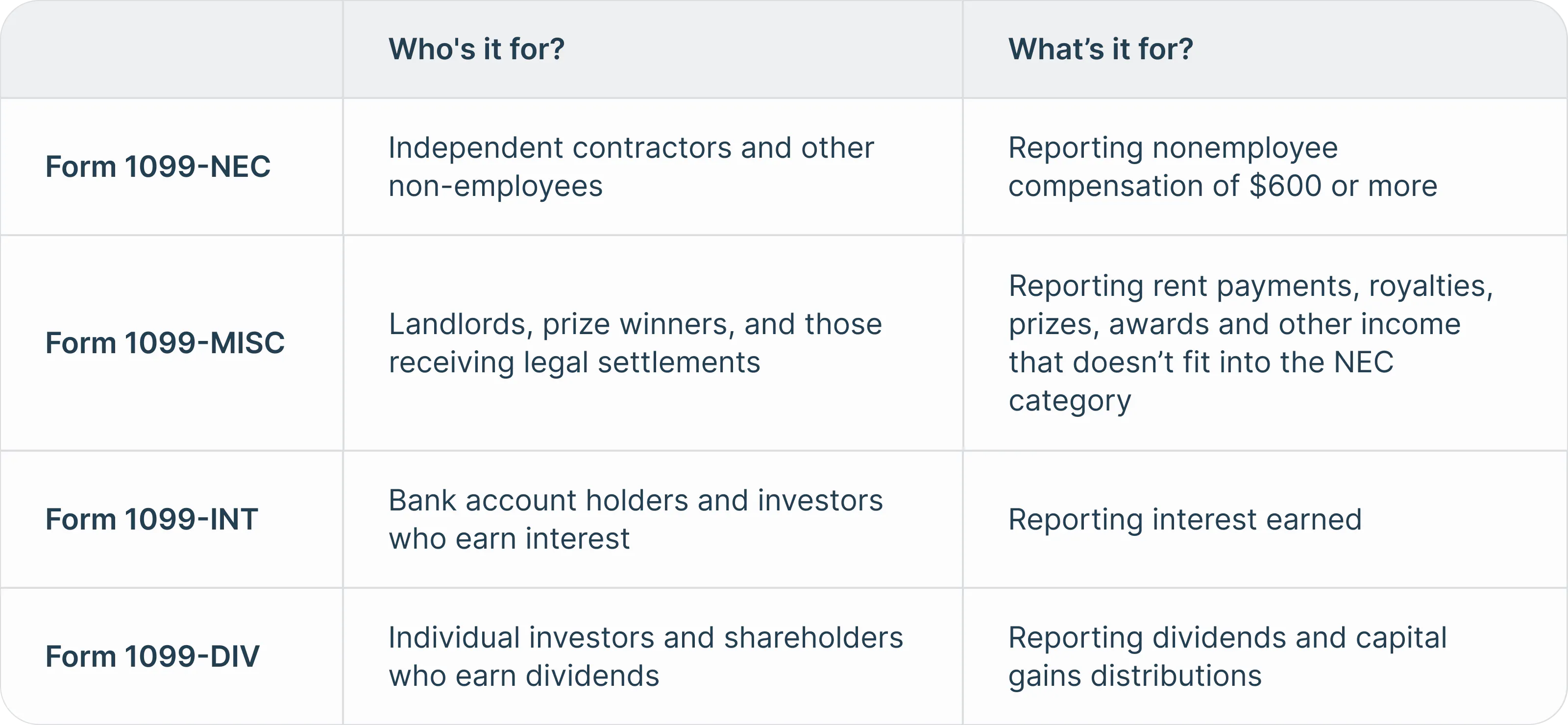
You can find the different types of 1099 below:
Form 1099 vs W-2: What’s the difference?
The 1099 form and the W-2 form both report income, but they apply to different working situations and tax responsibilities. The biggest difference between the two is tax withholding.
Form 1099:
- Reports gross income where no taxes were withheld
- You are responsible for self-employment tax, if applicable, and your standard income tax
- Used in preparing Form 1040, but also may require Schedule C for reporting business expenses
Form W-2:
- An income statement that reports all annual wages and taxes withheld
- Prepared by the employer by January 31
- Submitted to you (employee), the IRS and the Social Security Administration
- Used in preparing your Form 1040
What to do if you receive a 1099
When you receive a 1099, the first step is to review it to ensure accuracy. Then, store it securely with your tax records. You will use the form to file your federal and state taxes.
What if the information on your 1099 is incorrect?
If your 1099 contains incorrect information, contact the issuer as soon as possible. For example, if a client reports paying you $3,000 but actually paid $300, contact the client immediately. They are responsible for providing you and the IRS with a corrected 1099.
If they do not provide a corrected 1099, report the correct amount on your return and keep records, such as bank statements, that prove the error.
What to do if you didn’t receive a 1099 and should have
If you didn’t receive a 1099 when you should have, contact the payer to request it. However, whether they provide it or not, you must still report the income using your own records.
Do you need to send a 1099?
If you are a business owner and paid a contractor $600 or more for services, you are the 1099 issuer. You must collect a Form W-9 from the contractor and then send a 1099-NEC to them and the IRS by January 31 to avoid potential penalties.
How Form 1099 fits into the tax filing process
The 1099 is a component of your tax filing process. It serves as a record of income, helping ensure earnings are accurately reported to the IRS and included in your annual tax return. By staying organized, keeping track of your 1099s as they arrive, and using them to prepare your tax return, you can maintain accurate records and avoid reporting discrepancies and future issues with the IRS.
Have you received your 1099s and are ready to file your 2025 taxes? Find the IRS tax form you need and complete it online with ease using Lumin.
Meet our author

Share this post