
How to convert JPG to PDF
Author
Regine Dy
Published
Feb 10, 2026
Categories
PDF editing
Read time
3 mins
Converting JPG files to PDF is useful for organizing multiple images into one document, sharing visual content professionally or creating portfolios and presentations. The good news is, you don't need expensive software or technical expertise to do it.
4 [{"lang":"es-es","url":"/es/blog/como-convertir-jpg-a-pdf/"},{"lang":"fr-fr","url":"/fr/blog/comment-convertir-jpg-en-pdf/"},{"lang":"pt-pt","url":"/pt/blog/como-converter-jpg-para-pdf/"},{"lang":"vi","url":"/vi/blog/cach-chuyen-jpg-sang-pdf/"}]You can also read this article in Español, Français, Português and Tiếng Việt.
Table of contents
- 1. Method 1: Convert JPG to PDF online with Lumin
- 2. Method 2: Convert JPG to PDF on Mac
- 3. Method 3: Convert JPG TO PDF on Windows
- 4. Frequently asked questions
- 5. More document conversion tools
Share this post
This guide covers three reliable methods for converting JPG to PDF, starting with the simplest online option.
Method 1: Convert JPG to PDF online with Lumin
The quickest way to convert JPG to PDF is using Lumin's free online converter. It works in any browser, requires no account or download, and handles single or multiple images at once.
How to convert JPG to PDF using Lumin:
- Open Lumin’s free JPG to PDF converter and upload your PDF.
- Sign in to your account and select “PDF” as the output format.
- Click “Save on your computer” or choose “Save to Google Drive” to store your new JPG file.
Note: Lumin PDF lets you run OCR on your JPGs before converting them to PDF, so you can search, edit, and copy the text directly. You can also annotate, modify, or merge your images with other files, giving you complete control over your documents.
Method 2: Convert JPG to PDF on Mac
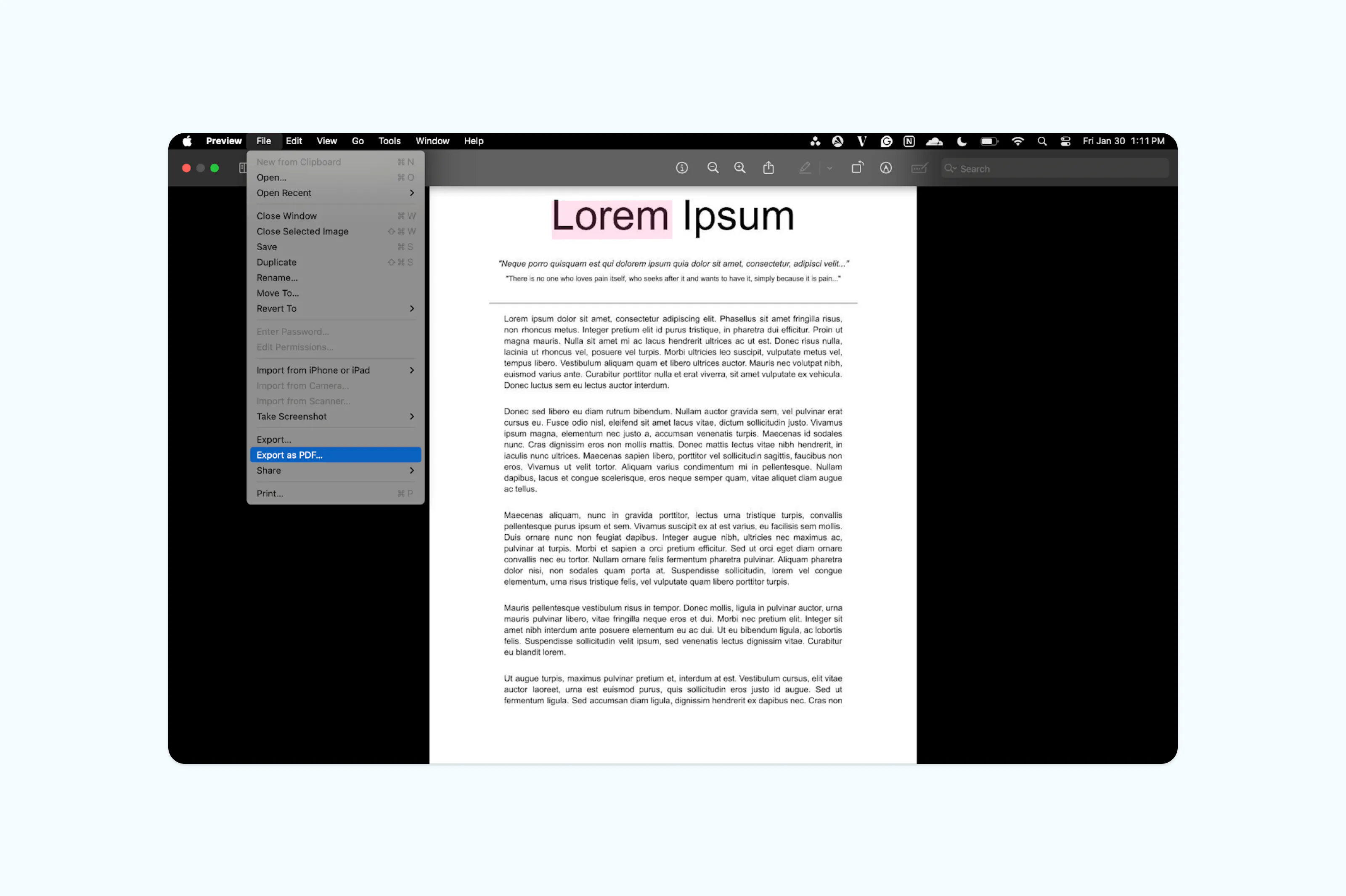
Mac users have a built-in option for converting JPGs to PDF using Preview, the default PDF viewer. This method works offline and doesn't require any additional software installation.
Here's how to save a JPG as a PDF on a Mac:
- Right-click your JPG and choose “Open With” > “Preview.”
- Go to File and select “Export as PDF.”
- Choose a save location and click “Save”.
Method 3: Convert JPG TO PDF on Windows
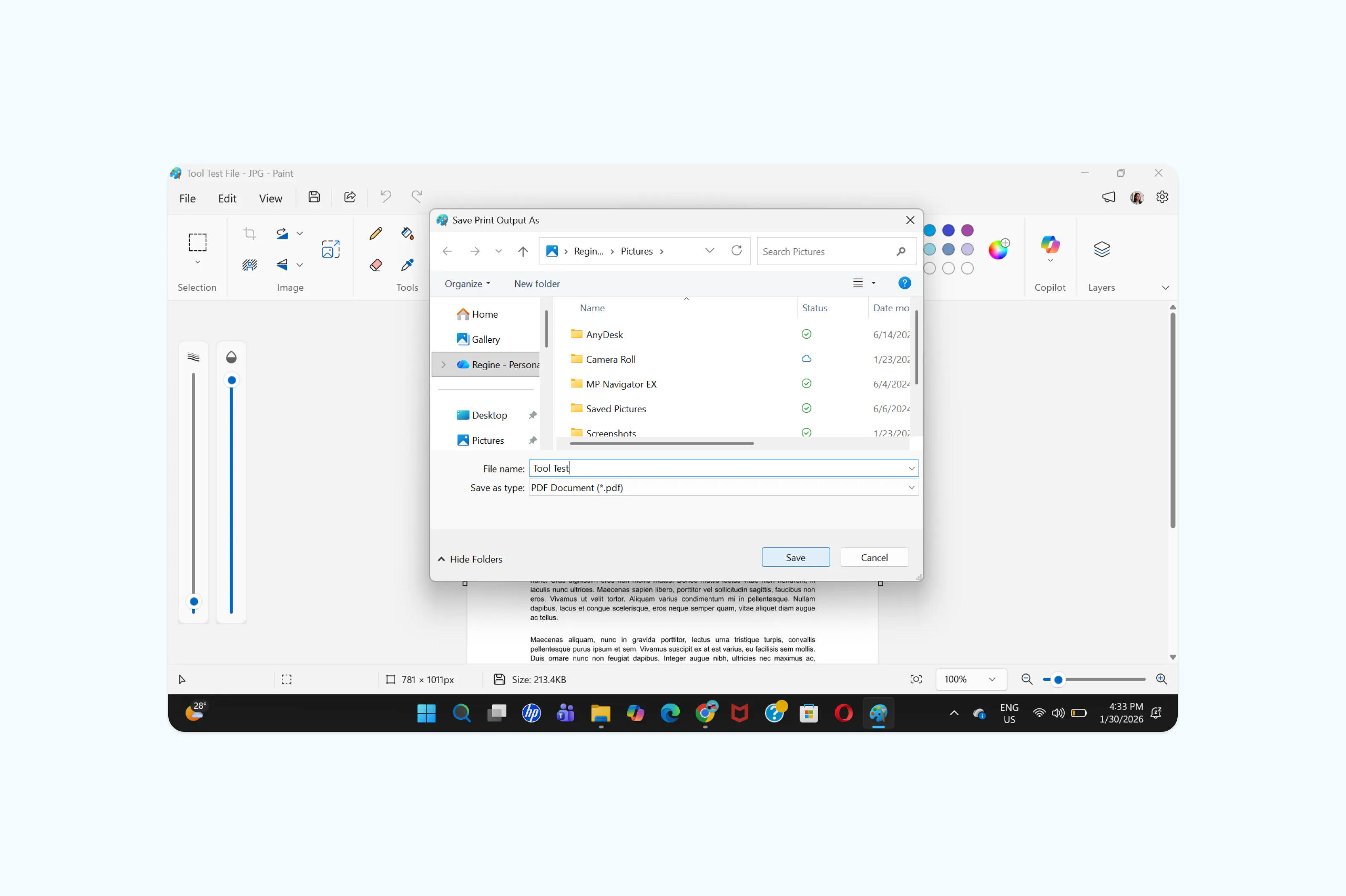
Windows allows you to convert JPG images into PDF files using built-in system tools. This method is free and does not require downloading any additional software.
Steps to follow:
- Open your JPG file in any application (Preview, Safari, Photos, etc.).
- Press “Ctrl + P” to open the Print menu.
- Select “Microsoft Print to PDF” as the printer.
- Click “Print”, then choose the folder where you want to save your PDF and confirm.
Frequently asked questions
Can I convert multiple JPG files to one PDF?
Yes, most conversion tools including Lumin allow you to upload multiple JPG images at once and combine them into a single PDF document. Each image becomes its own page in the final PDF, appearing in the order you uploaded them.
Will converting JPG to PDF reduce image quality?
The impact on quality depends on the compression level you choose. High compression keeps your file sharp while slightly reducing size, while medium and low levels prioritize smaller file sizes with minimal visible changes.
How do I convert JPG to PDF on my phone for free?
On Android or iPhone, Lumin PDF offers free conversion on mobile devices. Download the Lumin app on your phone, create an account, upload your document from the home screen, go to Tools, select Convert to PDF, and upload your document.
Can I convert JPG to PDF without installing software?
Yes, online converters like Lumin work entirely in your browser with no downloads or installations required. You can convert JPG files to PDF from any device with internet access, and your files are processed securely in the cloud.
Is it better to save images as JPG or PDF?
It depends on your use case. JPG is better for photos you'll view, edit, or share as images. PDF is better when you need a document format, like combining multiple images into one file, adding text or annotations, creating something that's easy to print and share professionally, or even compressing the JPG file to reduce size before conversion.
More document conversion tools
Need to convert other file types? Lumin offers a range of free conversion tools to help you work with different document formats.
Share this post