
Lumin Sign vs Conga Sign: Features, pricing, and benefits
Trying to decide between Lumin Sign and Conga Sign? We put them head-to-head so you can see which tool comes out on top.
4 [{"lang":"es-es","url":"/es/blog/lumin-sign-frente-a-conga-sign/"},{"lang":"pt-pt","url":"/pt/blog/lumin-sign-contra-o-conga-sign/"},{"lang":"fr-fr","url":"/fr/blog/lumin-sign-contre-conga-sign/"},{"lang":"vi","url":"/vi/blog/lumin-sign-so-voi-conga-sign/"}]You can also read this article in Español, Português, Français and Tiếng Việt.
Table of contents
- 1. An overview of Lumin Sign
- 2. An overview of Conga Sign
- 3. Features
- 4. Integrations and API
- 5. User experience
- 6. Security
- 7. Pricing
- 8. Comparison of Lumin Sign vs Conga Sign
- 9. Summary
Share this post
Wet signatures are a thing of the past. Thanks to Lumin Sign and Conga Sign, you can send out documents, get them signed and avoid the endless back-and-forth.
But which of these eSignature solutions is right for your team? We've lined them up so you can quickly compare features, pricing and more in one place.
An overview of Lumin Sign
Lumin Sign is an eSignature workflow automation platform that lets you send, sign and manage documents without the headache. Easy to use and intuitive, it helps your team stay organized and collect signatures faster, so you can focus on more pressing tasks.
Beyond eSignatures, Lumin's wider document management tools let you create, edit and manage PDFs and even generate and contracts and agreements, making it even easier to handle files from start to finish.
An overview of Conga Sign
Conga Sign also makes the eSignature workflow process a lot less stressful. It handles everything from sending to signing to tracking, so your team doesn't have to chase down signatures.
Both Lumin Sign and Conga Sign handle a wide range of document types that require signing, including legal agreements, sales contracts and purchase orders.
Features
Lumin Sign and Conga Sign are compliant and secure eSignature platforms packed with features, including bulk signing and audit trails. This means you can send documents to multiple people at once and track their progress in real time. Both also include template libraries, so you don't have to start a new document from scratch each time.
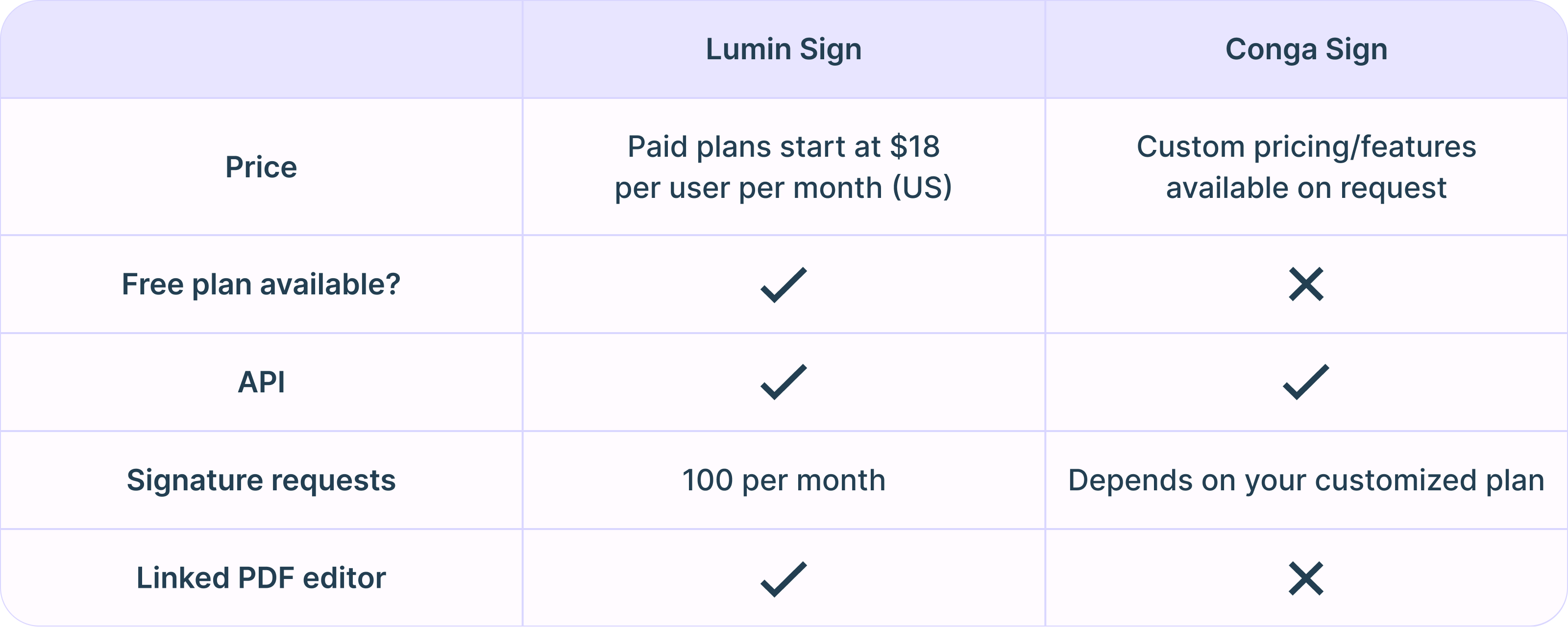
These platforms have different strengths, with specific features found on one but not the other. For example, Lumin Sign offers a free plan that allows you to send up to five documents for signing per workspace per month. Conga Sign doesn't have a free plan at all.
Integrations and API
Lumin Sign integrates with Dropbox, Salesforce, Slack, Google Drive and other tools through Zapier, making it easier to manage documents across different platforms. Conga Sign has a built-in connection for Salesforce, but doesn't offer direct integrations for anything else.
You can integrate Lumin Sign and Conga Sign with other software and apps through their respective APIs. Lumin Sign's API lets you experiment with different integrations in a sandbox environment before going live, ensuring everything runs smoothly.
User experience
Lumin Sign is easier to use than Conga Sign for certain features. For instance, Conga Sign occasionally experiences issues with document templates and write-back tags (placeholders that pull data from another system). Lumin Sign offers smoother templating and integrates better into workflows.
When it comes to customer service, Lumin offers responsive, top-tier support, helping you fix any issues quickly. In contrast, some users have reported slow and frustrating experiences with Conga Sign's support, with certain problems, such as templates and tags, taking almost a month to resolve.
Security
Lumin Sign and Conga Sign perform well in terms of security, with both platforms using encryption to protect documents and audit trails to track signatures. They also comply with industry standards and various data governance regulations, including GDPR.
Bear in mind that Conga Sign is HIPAA-compliant, but Lumin Sign is currently not.
Pricing
As well as its free tier, Lumin Sign offers two paid plans. Its most popular, Pro, costs $18 per user per month (US) and comes with features such as automatic email reminders and unlimited document templates. You can also send 100 documents for signing a month (signature requests).
Larger organizations will benefit from the Enterprise plan, which provides access to Lumin Sign's API and a dedicated customer success manager. You can also scale seats and tailor functionality to your team's usage, meaning you avoid paying for features you don't need. Prices are available on request.
While Lumin Sign offers clear, tiered pricing, things get complicated with Conga Sign, which offers customized pricing and features based on your organization's needs. As a result, you'll have to contact the company's sales team for a quote.
Comparison of Lumin Sign vs Conga Sign
Summary
While Lumin Sign and Congra Sign are both solid eSignature platforms, they differ when it comes to usability, integrations, pricing transparency and customer service.
For some teams, Conga Sign may be the more expensive option because it uses customized pricing rather than fixed tiers. There are also reports of slow support and technical issues with some features. On the flip side, it provides HIPAA compliance for healthcare organizations.
Lumin Sign has clearer pricing, responsive support and features that might be easier to use. Lumin also offers the bonus of PDF editing if desired.
You can try out Lumin Sign's features with a free trial - something Conga Sign doesn't offer.
See our other eSignature tool comparison guides:
Meet our author

Share this post