
HubSpot document generation: How to go from record to signed agreement
HubSpot can build a quote. It can't fill your own contract template with deal data. Here's where the native tools stop, which records feed an agreement and how to send one for eSignatures without leaving the deal.
Table of contents
- 1. Can you generate documents in HubSpot?
- 2. Which HubSpot records supply the data for an agreement?
- 3. How to generate documents from HubSpot records within Lumin
- 4. Benefits of HubSpot document generation
Share this post
The information you need to create a quote, contract or renewal agreement may already be sitting in HubSpot. Many teams still copy that data out of the CRM to build the document.
Someone pastes customer details into a template, checks pricing against the deal, updates the terms and sends it for signature. The signed document might get attached back to the record, but HubSpot can't read or update the data inside it. If a price or date changes on the deal later, the document and the record no longer match.
HubSpot handles some document workflows natively, quotes in particular. But populating your own agreement templates with CRM data takes a different approach. Here's what HubSpot can do on its own and where a document generation tool like Lumin fits in.
Can you generate documents in HubSpot?
Yes, but only for certain types of documents.
HubSpot's native quote tools can generate branded quotes using deal information and line items. To add terms, collect eSignatures or click-to-accept approvals and handle billing and payments through the quote workflow, you'll need Revenue Hub Professional or Enterprise and the appropriate Revenue Hub seat.
HubSpot also has a Documents tool, but it serves a different purpose. You can use it to upload, organize, share and track sales content, such as PDFs and other files. It doesn't generate documents or merge CRM data into your existing contract and agreement templates.
What can HubSpot document generation do natively?
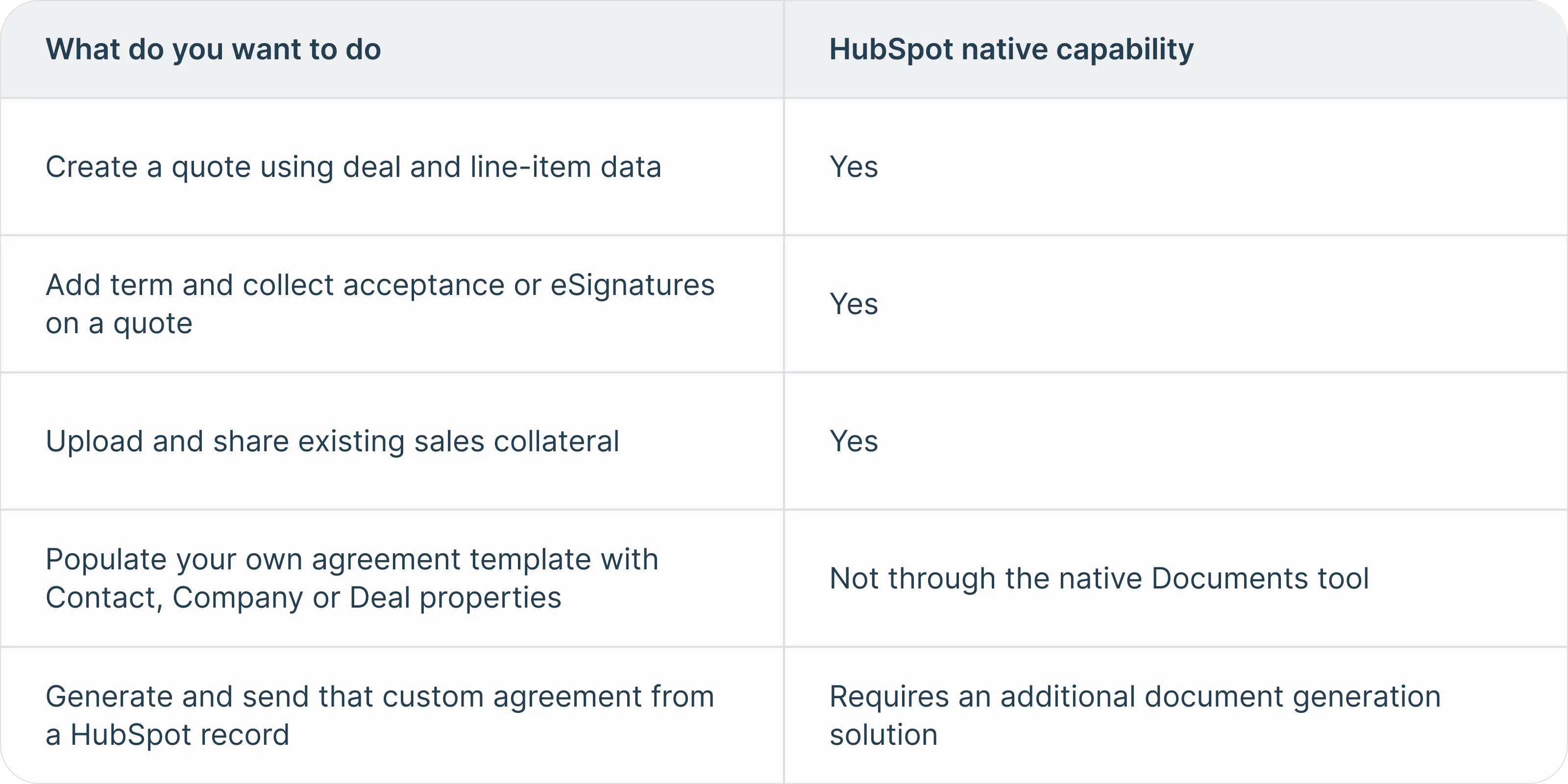
For contracts, renewal agreements and other documents that use custom templates, document generation can pull CRM data into the document instead of requiring someone to re-enter it.
Which HubSpot records supply the data for an agreement?
A single agreement may pull information from several HubSpot records. For example:
- Contact properties can supply information about the person receiving or signing the agreement, such as a name, job title, email address or phone number.
- Company properties can supply business-level information, such as the company name and address.
- Deal properties can supply information tied to the transaction, such as the deal amount, close date and other commercial details stored in standard or custom properties.
HubSpot maintains default properties for Contacts, Companies and Deals, and users can also create custom properties to store information specific to their business. That lets one agreement combine the signer's information, company details and deal-specific terms without storing all of that data on a single record.
What about line items?
Line items are useful when a document needs to list the products or services in a deal. In HubSpot, line items can include details such as price, discounts and billing terms. They're associated with deals and used to create quotes.
If your agreements list products or services, check how your document generation tool handles line items before you build a template around them. Ideally, one template should handle any number of products without being rebuilt for each deal.
How to generate documents from HubSpot records within Lumin
Once the HubSpot integration is connected, Lumin can use Contact, Company and Deal properties to populate an AgreementGen template. You can then generate, review and send the agreement for signature from the HubSpot record.
1. Connect Lumin to HubSpot
Install the Lumin app from the HubSpot marketplace, grant the required permissions and connect the appropriate Lumin workspace.
You can add the Lumin app card to Contact, Company or Deal records, depending on where your team normally starts the agreement process.
Learn more: Integrating Lumin With HubSpot
2. Prepare and map your agreement template
In Lumin AgreementGen, upload the template you want to use and add roles for anyone who will need to complete or sign fields.
Then open the Lumin app card in HubSpot and select View variables. Lumin automatically creates a corresponding variable for each Contact, Company and Deal property in your HubSpot account, including new custom properties you add later.
Copy the variables you need into the appropriate places in your agreement template so HubSpot data populates when the document is generated.
Before proceeding, assign any signature or fillable field to the correct roles.
Learn more: How Do I Map Lumin Templates in HubSpot?
3. Generate and review the agreement
From the HubSpot record, select Create and Generate Agreement, choose the mapped template and preview the document.
Check that required fields populated correctly and that pricing, dates and signer information match the current HubSpot record before sending.
Review matters most the first time you use a template, or after someone changes the HubSpot properties behind it.
Learn more: How Do I Send and Manage Agreements For Signature in HubSpot?
4. Send the agreement for signature
When the agreement is ready, create a signature request from the Lumin app card. Select the mapped template, add the recipients and set a due date if needed.
The number of signer roles available in HubSpot reflects the roles configured in the template. You can also add someone as a viewer if they need access to the agreement but don't need to sign it.
5. Track the agreement from HubSpot
After sending, you can check the agreement status and recipient activity from the HubSpot record. Once the final signature is collected, Lumin marks the agreement approved and attaches the signed copy to the record.
Benefits of HubSpot document generation
Document generation keeps the agreement closer to the data and workflow already in HubSpot. The HubSpot record remains the source of truth for the customer and deal information used to generate the agreement.
- Cut down on retyping: Customer, company and deal information can populate the agreement from mapped HubSpot properties.
- Keep templates consistent: Teams can reuse the same approved template while deal-specific information changes from one agreement to the next.
- Reduce handoffs: Once the template is configured, HubSpot users can generate, review and send agreements from the record instead of routing them elsewhere for preparation.
- Keep the signed copy with the record: After the final signature, Lumin attaches the completed agreement to the HubSpot record, keeping the signed document with the customer or deal information.
With Lumin, teams can use HubSpot data to populate reusable agreement templates and manage the process through signing without rebuilding them by hand.
Explore the Lumin HubSpot integration.

Share this post