
Lumin Sign vs Docusign: Features, pricing, and security
Choosing between Lumin Sign and Docusign comes down to features, pricing, and how each handles security. We line them up side by side so you can see where they overlap, where they differ, and which is the better fit for your team.
4 [{"lang":"vi","url":"/vi/blog/lumin-vs-docusign/"},{"lang":"fr-fr","url":"/fr/blog/lumin-vs-docusign/"},{"lang":"pt-pt","url":"/pt/blog/lumin-vs-docusign/"},{"lang":"es-es","url":"/es/blog/lumin-vs-docusign/"}]You can also read this article in Tiếng Việt, Français, Português and Español.
The breakdown:
- 1. What is Lumin Sign?
- 2. What is Docusign?
- 3. Features
- 4. APIs
- 5. User experience
- 6. Security
- 7. Pricing
- 8. Lumin Sign vs Docusign at a glance
- 9. Summary
Share this post
If you need to collect and manage eSignatures, Lumin Sign and Docusign both get the job done. However, each comes with its own features and pricing structure, so you'll want to compare them in-depth to see which one's the better fit.
We pit Lumin Sign and Docusign side by side, helping you choose the right tool for your business.
What is Lumin Sign?
Lumin Sign is a cloud-based eSignature workflow automation platform that helps you send, sign, and manage documents digitally. You get everything you need to handle your document lifecycle, from robust security to automated reminders for signers to take action.
With Lumin Sign, you no longer need to print and mail documents and collect wet signatures. Instead, you can manage contracts and other legal agreements on your desktop or mobile device and make sure they're secure and legally binding.
What is Docusign?
Like Lumin Sign, Docusign is an eSignature workflow automation tool that makes collecting digital signatures easier than ever. It offers similar capabilities for sending and signing documents, such as signature tracking and top-tier security.
Features
Lumin Sign and Docusign have many core features that overlap, such as compliance with data protection standards in your location and industry.
These tools also support reusable templates so you don't have to rebuild the same document setup each time. Lumin Sign Templates lets you configure signature fields, text boxes and signing roles on a document once, then reuse it whenever you need. It also includes pre-drafted options like NDAs, lease agreements, and employment agreements if you'd rather start from one of those.
You'll find plenty of integrations on Lumin Sign and Docusign that improve eSignature workflows even more. Both platforms integrate with Salesforce, Google Workspace, Microsoft OneDrive, and through pre-built connectors.
APIs
Both Lumin Sign and Docusign have enough document management features out of the box to satisfy most businesses. However, you can customize your workflows even further, especially if you have more complex eSignature needs.
This is where APIs come in. They open the door to deeper, custom integrations with your existing systems. Take Lumin Sign. It has a GDPR- and PCI-DSS-compliant eSignature API with enterprise-grade security. Docusign offers something similar, allowing you to extend eSignature functionality in any way you choose.
User experience
Lumin Sign is more intuitive and user-friendly than Docusign, with an interface that's simple to use, even for those who have never managed eSignatures before. Docusign has a slightly steeper learning curve, primarily because it has more configuration options for complex eSignature workflows. Both platforms have comprehensive help centers and tutorials to support users.
Security
Security is certainly something you'll want to consider when deciding between eSignature tools. Lumin Sign and Docusign take data protection very seriously, so you can keep the contents of all your legal agreements safe.
Identity fraud is one of the biggest threats facing agreement workflows today. Recent Lumin research into digital identity in business found that more than half of organizations had suffered identity fraud over the last 12 months, and 94% believed agreement workflows were vulnerable to AI-powered fraud.
Lumin Sign's Verified Digital Signing offers an evolution in digital signature security. Most eSignature workflows assume the signer is the right person because they have access to the email inbox. Verified Digital Signing, an optional feature, closes that gap. It requires parties to prove their identity at the point of signing against a verified digital credential stored on their device.
Both Docusign and Lumin Sign offer SOC 2 Type 2 attestation and eIDAS compliance, ensuring your signatures stay secure across different geographical regions. Also, Lumin Sign stores data with Amazon Web Services (AWS), which offers the highest standards of cloud security.
Note that DocuSign is HIPAA compliant and Lumin Sign isn't, which makes DocuSign the better pick for US healthcare teams handling PHI.
Pricing
One of the biggest differences between Lumin Sign and Docusign is their pricing structure:
Lumin Sign
Lumin Sign is now included as part of the Lumin Agreements plan, which is a larger toolbox for eSignature workflow automation. It also offers:
- Lumin Sign
- Lumin Templates, which we mentioned earlier
- AgreementGen, Lumin's AI-powered assistant that generates documents from simple prompts.
Lumin Agreements has a free tier, offering 5 free documents per workspace per month, legally compliant eSignatures, and other features. However, consider subscribing to a paid plan if you want additional capabilities. You're not locked in and can cancel at any time.
For $18 USD per user per month, the Pro plan offers everything included on the Free plan, but ups the document quota to 100 documents per user each month, as well as automated email reminders for signers, unlimited signing templates, priority support, and more.
There's also an enterprise-grade plan for larger teams, which provides access to Lumin Sign's API and a dedicated customer success manager.
Docusign
Docusign's subscription plans are more complicated than Lumin Sign's, with pricing based on whether you want:
- Basic eSignature management functionality, or
- Access to the platform's Intelligent Agreement Management (IAM) features, which include AI and identity verification
The business eSignature plans start from $45 USD per user, per month (billed monthly). For this price, each user can send 10 "envelopes" per month (what Docusign calls documents sent for signature) and access features such as shared templates and real-time commenting.
There's also a free tier with basic features, but it doesn't allow users to send documents for signing.
The IAM plans offer unlimited envelopes and more advanced eSignature management capabilities, including workflow automation. Prices for businesses start from $75 per user, per month.
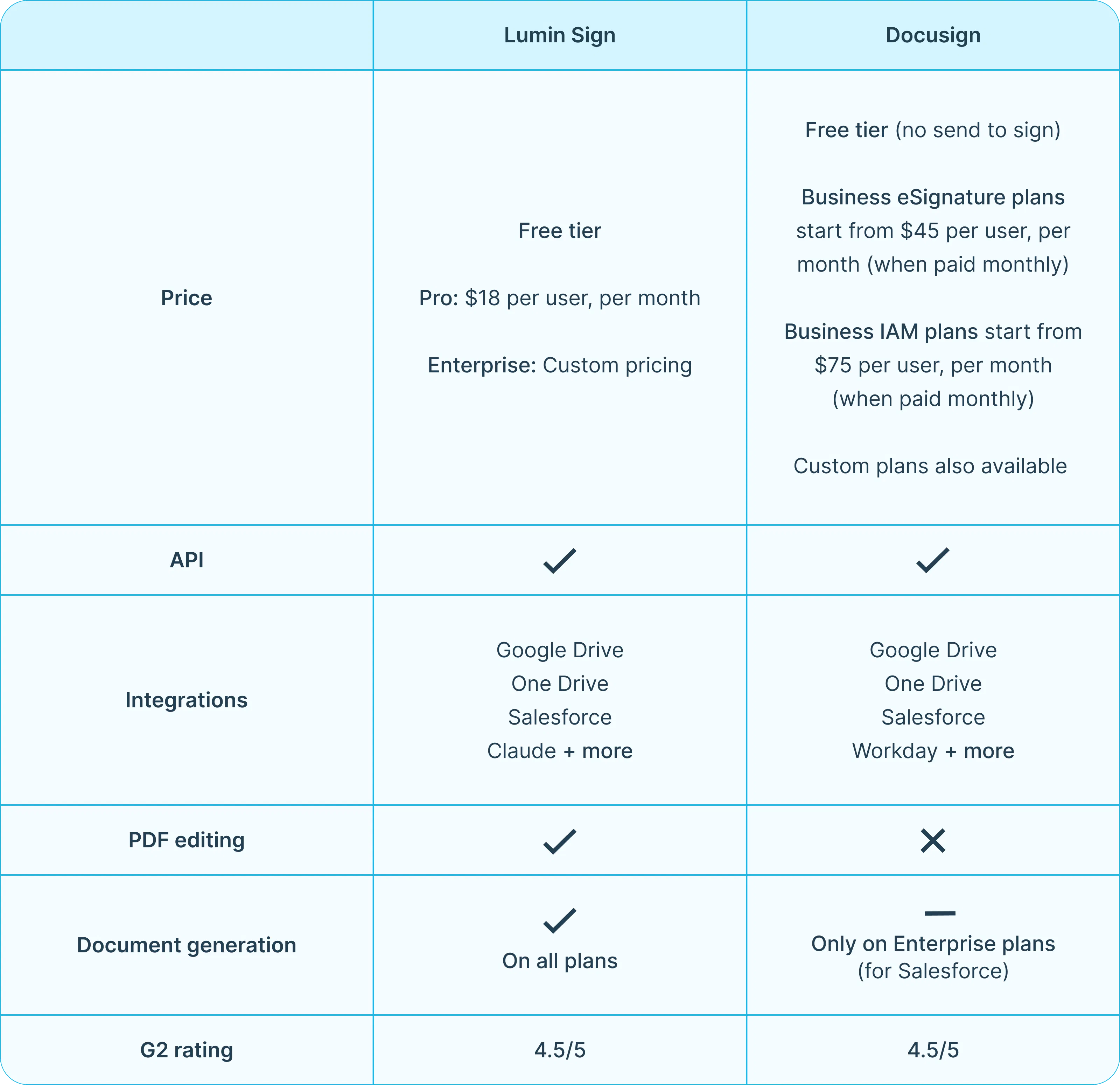
Lumin Sign vs Docusign at a glance
Summary
Lumin Sign and Docusign both help you manage eSignatures in your business. However, they can differ when it comes to features and pricing. You can always try both tools for free and then decide which one you prefer.
Ultimately, your decision will be based on how well each platform integrates into your organization, the features you need, and your budget.
Before you go, check out some of our other eSignature tool comparisons:

Share this post